


I discovered Smart Game Booster while trying to fix constant stuttering in Valorant. My ping kept spiking during peak hours, and I was tired of losing gunfights because of lag.
A friend mentioned this game booster tool, so I decided to try it myself and see if it actually helps or just eats up disk space.
What Is Smart Game Booster
Game Booster is a PC optimization app from iTop Inc built for gamers. The newest version 6 adds network acceleration, hardware boosting, and compatibility checks. It promises smoother frame rates, lower ping, and a cleaner system overall. I installed it on my Windows 11 machine to see how it performs in real gaming sessions.
What’s New in This Version
Before diving into my experience, here’s a quick rundown of what changed:
- Network Acceleration: 500+ servers worldwide, lower latency, dodges peak-hour congestion, routes around network blocks
- Super Boost: Overclocks GPU/VRAM for up to a claimed 30% performance gain
- PC Boost / Auto Boost: Auto-disables background apps and switches on gaming mode when you launch a game
- Can I Run It (expanded) : 160,000+ games, 3,000+ GPUs, 9,000+ CPUs for instant compatibility checks
- Guard: New security layer for your PC and game accounts
- Real-Time Monitor: Tracks hardware temps and usage live
- Redesigned UI: Cleaner, more gamer-focused layout
My First Impressions
The interface feels modern and built with gamers in mind. Everything is laid out clearly, so I did not need a tutorial to get started. The standout feature is the one-click dual acceleration for both your hardware and network.
How I Used the Game Booster
Here is exactly how I got it running for my own setup.
- Step 1. I downloaded and installed Smart Game Booster, then opened it right away on my desktop. First, you can see that the homepage features many popular games, such as COD, CS: GO, and Valorant.


- Step 2. I picked Valorant, then it lets you optimize PC performance and internet together in one click. It works by freeing up your PC’s RAM and CPU to increase the frame rate, while also fixing network connection issues and lowering game latency.


- Step 3. After clicking “Accelerate Now,” I want to mention the Super Boost feature. It can safely push your GPU and VRAM performance to their optimal levels. It uses calibrated safe thresholds to increase clock speeds without overheating the hardware, bringing you a risk-free FPS boost.
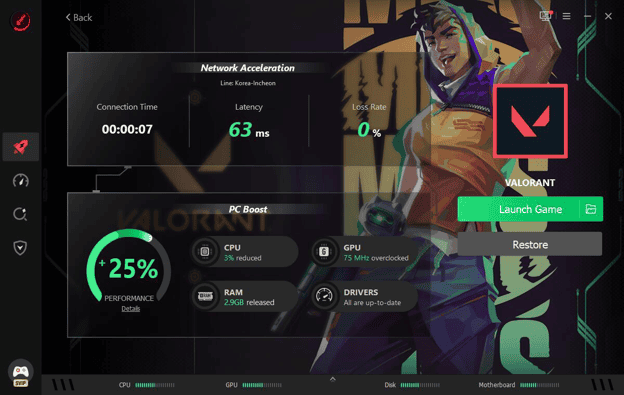
- Step 4. I jumped into Valorant and watched my FPS and ping numbers in real time. This FPS booster includes a customizable overlay that displays the exact FPS, CPU/GPU temperatures, and usage directly on the screen while playing. I can monitor my PC’s health without leaving the game.
The Good Stuff
The network acceleration feature genuinely surprised me. My ping dropped noticeably during a late-night session when servers are usually crowded. The Super Boost feature also squeezed out extra frames by adjusting GPU and VRAM settings.

Some things I appreciated:
- Auto Boost switches on gaming mode without me lifting a finger
- The Can I Run It database is huge and instantly checks my hardware against a game.
- Real Time Monitor caught my GPU running hotter than expected during a long session.
- Driver updates happened in the background without any extra clicks.
The Not So Good Stuff
No tool is perfect, and this one has a few rough edges worth mentioning. The initial scan took longer than I expected on my older laptop. Some optimization features overlap with built-in Windows tools, so they felt slightly redundant. A few times, the app nagged me with upgrade prompts for premium features.
Here are other things to watch for:
- Certain advanced settings are locked behind a paid tier.
- It runs as a background process that constantly uses a bit of RAM.
- Not every game in my library was recognized right away.
- The UI, while attractive, can feel a bit busy for simple tasks.
Is It Bloatware or Genuinely Useful
After weeks of daily use, I would not call it bloatware. It does what it claims for the most part. The ping reduction alone made ranked matches less frustrating for me. That said, if you already run lean Windows settings and update drivers manually, the gains may feel smaller. For casual or competitive gamers who want a simpler all-in-one solution, this tool earns its place.

Who Should Try This Game Booster
If you play online games and deal with lag during peak hours, this is worth testing. If your PC already runs smoothly and you enjoy manual tweaking, you might not need every feature. I found the most value in the network acceleration and auto-boost combo, since it saved me from manual effort every session.
My Honest Verdict
Smart Game Booster is not magic, but it is not fluff either. It delivered real improvements in my ping and frame rates during actual gameplay. The free version covers enough for casual users, while power users may want the paid features. I plan to keep it installed for now, since the convenience outweighs the minor annoyances I’ve run into.
If lag and low FPS have been ruining your gaming sessions, give this Game Booster a shot. Download Smart Game Booster today and see the difference in your next match. Your K/D ratio and your patience will probably thank you.




