



I used to think that software could never do anything to negatively impact my life. But then I tried uninstalling a video editing program from my Windows PC. What should have been a quick “right-click uninstall this program” moment took me three days, lots of error messages, and several tears.
Windows Couldn’t Uninstall This Program!
Long story short, I downloaded an uninstaller called IObit Uninstaller that allowed me to forcibly remove the offending program. Here’s everything I learned along the way.
The uninstaller tool worked! From left to right: Windows search, Programs and Features list, and IObit Uninstaller.
The Software That Crashed and Burned
I’ve been editing videos on my PC for about a year now. I used this free video editing program for pretty much all of that year. It was working fine until an automatic update started to install one day. The installer quit halfway through and froze my laptop. I had to hard restart, and when Windows opened back up, the program was glitched.
It opened to a blank white screen and then immediately crashed back to the desktop. Not cool. I decided the best course of action would be to uninstall it completely, download the newest version from their website, and try reinstalling. So, I went into Settings > Apps > Uninstall and clicked Uninstall like I’ve done literally hundreds of times before.
The circular progress bar showed up and moved for about two seconds. Then it just stopped moving. No error message, no indication that something didn’t work. Nothing.
This happened EVERY time I clicked uninstall. So, I restarted my PC and tried again, just to rule out any temporary glitches. Same issue. Evidently, Windows wasn’t going to uninstall this program for me.

What Didn’t Work
I figured since Settings wouldn’t uninstall it, I should open up the Control Panel and try that route instead. Maybe a different uninstaller would let me delete the program. Spoiler alert: it didn’t.
This time, instead of getting stuck, I actually got an error message. “The uninstaller could not find the necessary files to complete this action.” So not only did my program not work, but now Windows couldn’t uninstall it properly either.
I tried looking for the program installer on my PC, thinking that maybe I could run it and trigger some kind of repair/remove option. That didn’t work because the installer itself was corrupted by the failed update.
I decided to take a peek at the Registry Editor too, thinking I could maybe delete the program myself manually. But screw that. I know 0% about the registry and was scared I’d break something else by poking around that sucker.
How To Uninstall Programs Windows Won’t Uninstall
It was now the second day of me trying to uninstall this stubborn program. At this point, it was less frustrating and more worrying. What if this program caused issues later down the line? I use this PC for client work. I couldn’t have some random program cause problems in the future because I couldn’t uninstall it in the present.
IObit Uninstaller worked! Long story short…
My buddy suggested I give IObit Uninstaller, a great uninstaller for Windows, a try. I hadn’t heard of it before, so I was hesitant. I’ve downloaded tons of “magic” software programs that claim to do all these wonderful things and usually end up doing nothing at all. Still, I was desperate at this point.
I downloaded the program and hopefully installed it. IObit Uninstaller walked me through the steps needed to remove Windows programs that just won’t uninstall. It also looked super easy to use.
Here’s What Impressed Me About IObit Uninstaller:
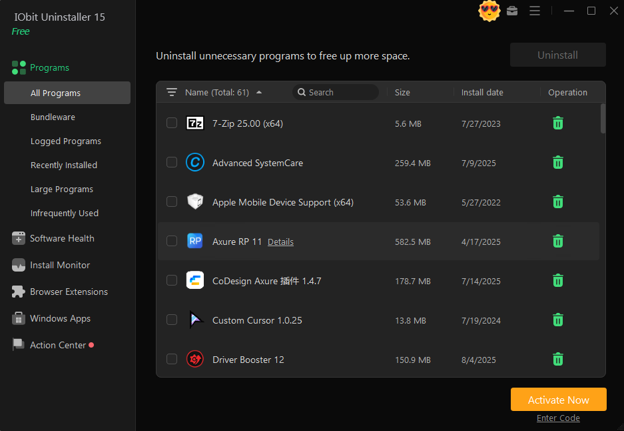
Installation took all of 2 minutes. It opened up and presented me with a list of every program I had installed on my PC. It reminded me of the Programs and Features list you can access in Windows Settings, but with way more details about each program.
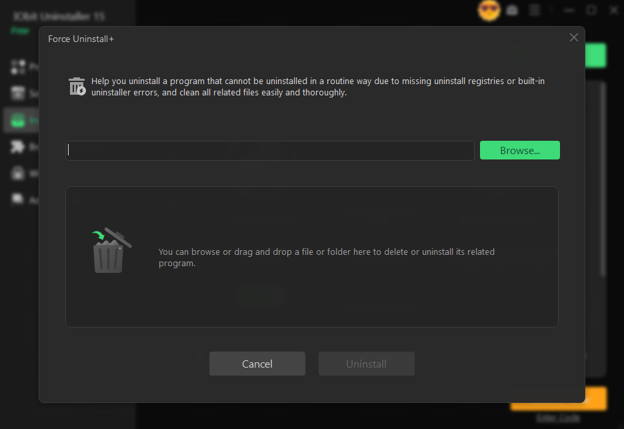
I quickly found my problem program and clicked on it. From here, instead of showing me a boring uninstall button, I saw a highlighted link that said something along the lines of “force uninstall.”
Force Uninstall Process
What came next was something straight out of my daydreams the past few days. Instead of clicking uninstall, I clicked that force uninstall link. Instantly, the program started scanning my computer for any trace of the program I wanted to remove. It wasn’t looking for the main .exe file that got corrupted and refused to uninstall. It was digging through temporary folders I didn’t know existed on my PC, just trying to find ANY file associated with this program.
It may have only taken about 5 minutes for the program to force uninstall the other program, but it searched through every corner of my PC that I’m aware of. When finished, I saw another list detailing everything it found and took off my hard drive. I liked that I could see everything it was uninstalling rather than just being told it was done.
Did it work?
It worked! I restarted my computer (just to be safe), and upon reopening, my problem program was nowhere to be found. Not only did it disappear from my Start menu, but it was gone from my Programs and Features list as well. I browsed through some of the folders it used to live in and saw it was completely wiped from my computer.
I peeked in my registry, too, just to be sure. Again, nothing! I’m by no means a registry guru over here, but I knew what to search for based on the program name, and there wasn’t anything! Removing stubborn programs is annoying, but IObit Uninstaller made it tolerable.
Final Words
Maybe you’re reading this thinking, “Dude, why didn’t you just uninstall BOOTCAMP first?” Well, first off, I don’t have a MacOS. Second, there will come a time when you’re itching to delete a program off your PC, but it’s just not happening. Whether it’s due to errors or corruption like mine, you’ll want that program gone.
Hunting around Google and through forums to find step-by-step instructions on how to remove every lingering piece can be a pain. Especially if half the solutions require you to edit your registry (and you’re like me and have no idea what you’re doing).
IObit Uninstaller streamlined what would typically be an annoying process for me into simple steps that produced results. If your PC ever has an unremovable program, look no further than IObit Uninstaller.




