
For the past few years, the field of generative video has been curiously silent. We have become accustomed to watching “ghost clips”—visually stunning sequences of people talking, cars crashing, and forests rustling, all completely devoid of sound. To create a usable piece of content, creators had to undertake a laborious post-production process: generating voiceovers, finding stock sound effects, and manually syncing them to the video. This friction has been a major barrier to entry. My recent testing of Kling 3.0 suggests that we are entering a new phase where audio and video are no longer separate manufacturing processes, but a single, unified output.
This shift is not merely a convenience; it fundamentally changes the “uncanny” nature of AI video. When a character’s lips move in perfect phonetic synchronization with the generated audio, the brain accepts the illusion far more readily.
The “Audio-Visual Unified” capabilities I observed indicate that the model understands the semantic link between the sound of a word and the shape of the mouth required to produce it.
The Technical Challenge Of Lip-Sync And Ambience
In traditional animation, lip-sync is a dedicated discipline. In generative AI, it has historically been a weakness. Previous workflows involved generating a video, then using a separate “lip-dub” AI to warp the mouth to match an audio file. This often resulted in blurry lower faces or robotic jaw movements.
The integrated approach works differently. By generating the audio waveform alongside the pixel data, the model ensures temporal coherence. If a character shouts, their body language and facial tension reflect that volume intensity.
Furthermore, the audio extends beyond dialogue. The system generates diegetic sounds—footsteps on gravel, the hum of traffic, the rustling of clothes—that match the visual materials. This creates a “soundscape” that is spatially aware, adding a layer of immersion that silent video simply cannot achieve.
Evaluating The Efficiency Of Unified Generation
To understand the impact on workflow, I compared the steps required to produce a 10-second dialogue scene using the “Old Stack” versus the unified method found in this latest iteration.

| Workflow Stage | Fragmented “Old Stack” Workflow | Kling 3.0 Unified Workflow |
| Visuals | Generate Video (Prompt A) | Generate Video + Audio (Prompt A) |
| Audio | Generate TTS (Tool B) | Included in Generation |
| Syncing | Manual Edit / Lip-Sync Tool (Tool C) | Automatic / Native Sync |
| Ambience | Search Stock Library / Layering | Auto-Generated Ambience |
| Total Tools | 3-4 Different Platforms | 1 Single Platform |
Sound As A Narrative Driver In Prompting
One interesting observation is how audio capabilities influence prompt engineering. You are no longer just describing what the viewer *sees*, but what they *hear*. Prompts can now include auditory descriptors like “whispering,” “crowded room noise,” or “echoing hallway.”
The model appears to use these cues to adjust the visual performance. A character “whispering” will lean in and minimize mouth movement; a character “shouting” will have wider gestures.
This feedback loop between the audio prompt and the visual output creates a more cohesive performance. It moves the creator from the role of a “cameraman” to that of a “director,” managing the entire sensory experience of the scene.
Step-By-Step Workflow For Audio-Driven Video
For creators looking to leverage this feature, the process requires attention to the audio-specific toggles within the interface.

Crafting A Multi-Sensory Prompt
Begin by entering your text prompt. It is essential to explicitly state the dialogue or the nature of the sound. For example: “A woman looking at the camera, saying ‘I cannot believe we are finally here,’ with wind noise in the background.” The specificity of the dialogue ensures the lip-sync model triggers correctly.
Enabling Audio Generation Parameters
In the settings panel, you must verify that the audio generation features are active. This is often a toggle or a specific selection within the “Generate Audio” section. You may have options to define the voice tone or the style of the background track. Ensuring these align with the visual mood is key to avoiding a tonal mismatch.
Previewing The Synchronized Output
Once generated, the preview player allows you to watch the video with sound. Listen for the alignment of the “plosive” sounds (P, B, T) with the lip closure. If the sync is accurate, the video is ready for export. The file will contain the audio track embedded, ready for publishing without the need for external sound design software.
The Reality Of Current Audio Fidelity
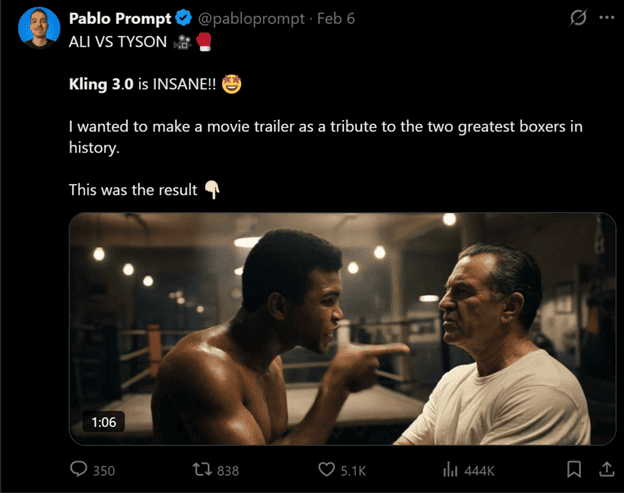
While the synchronization is impressive, the audio fidelity itself has nuances. In my tests, the voice generation is clear but can sometimes lack the dynamic range of a professional human actor.
The background ambience is generally effective but can occasionally sound generic. It is best viewed as a high-quality “scratch track” or a solution for social media content where speed is prioritized over cinematic audio mastering.
However, for the majority of digital content use cases, the ability to generate a talking head that actually *talks*—in one click—is a transformative capability that drastically reduces production time.