


YouTube is one of the most popular websites, watched worldwide. You can find all kinds of content on YouTube, whether it’s for kids or adults who love to watch movies, songs, or anything they like.
People also love to share YouTube videos on other platforms as audio, or they may want to save the audio on their phone; for that, they need the best YouTube to MP3 converter.
People love converting videos to MP3 because they want to listen to the audio whenever they are free, whether on a plane, bus, or in bed.
Why do you need a YouTube-to-MP3 converter?
If you want to save YouTube videos as audio, you need a good YouTube to MP3 converter. This tool makes your job easy: all you need is the link to the video you want to convert to an audio file, and with one click, it does the rest for free.
Converting a YouTube video into an audio file can save you a lot of time, since the music or voice is available offline and ready whenever you need it, while also making it easier to study the kind of content that can expand your reach with more YouTube views.
Before downloading or converting any YouTube video into an audio file, make sure you have the copyright owner’s permission, as stated in YouTube’s terms of service.
What to consider in a good Video Converter?
The real hunt begins when you want the best video-to-MP3 converter tool because lots of tools claim to do the job perfectly, but not everyone is perfect.

You will see lots of tools come with extra software you obviously don’t want to install, or some are bundled with lots of ads, or they have restrictions that make your work frustrating.
Many YouTube video converters are too slow and can also give you nasty surprises when downloading and converting videos, such as CAPTCHAs or unwanted pop-ups. If you are looking for the best YouTube to MP3 converter, keep these three basic rules in mind.
- The converter should be online so that you can convert your videos easily. Many people don’t want to install the additional software because it is annoying and eats up lots of space.
- You just need to copy and paste the URL of the video into the tool, which enables you to download.

- There should not be any pop-ups or unwanted ads when you want to convert and download the file.
3 Best YouTube to MP3 Converters you need to use
1. Mp3x.cc
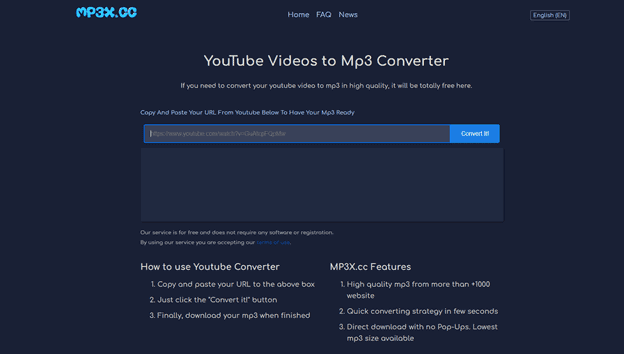
If you want to convert a YouTube video to an MP3 file, then you should instantly use this basic, stylish tool because of its superb performance and speed. It is totally free to convert the video into a high-quality MP3 format without using lots of your mobile’s space.
You just need to open this website and copy and paste the URL of the YouTube video that you want to convert and save. With just one click button this website will do wonders for you in a few seconds.
You don’t have to face any pop-ups or ads when you click the button to convert because it is a free tool. MP3X.CC will do its job quickly within a short time, and it can be easily operated with any device, such as an iPhone, Android, Windows, Mac, or others.
You just keep in mind that the size and quality of the audio totally depend on your internet speed. The good news for you is that now you can also make use of this site to convert videos from Dailymotion, Spotify, SoundCloud, Vimeo, and other platforms too.
2. Odownloader
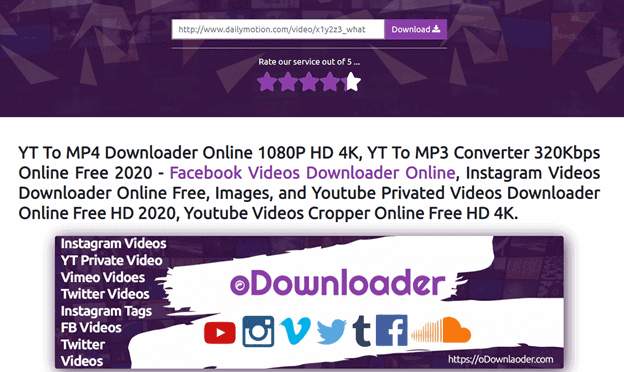
odownloader is an outstanding platform that does your job within a few seconds because all you need is to copy and paste the URL of the YouTube video that you want to download and convert.
When the link is added to the box, you have to click the convert button, and it will start doing its job. With this website, you cannot only convert an audio file to MP3 format but also an MP4 video file.
When the video is converted, it will go directly to your Dropbox, or you can also download it to your computer. Although it’s a good video converting tool but it has its own limitations as well. The limit of this tool is that you can only convert videos up to 1 hour in length.
3. GenYouTube:
GenYouTube is another great platform that easily converts YouTube videos to MP3 files. You cannot only convert the videos to MP3 audio files but also to video files.
The downloading and converting process in the tool is also the same as mentioned above because you just need to put the URL of the video that you want to convert. Before converting the file, you have to select the format, whether you want to convert it to MP3 or MP4.
Another good feature of this website is that you can also make use of this service by installing the browser extensions that are available for Google Chrome, Firefox, and Safari.
Conclusion:
These days, people also use the official YouTube app, known as YouTube Music, in which you can listen to your favorite music or albums, but it is not affordable for many users because you have to pay $9.99 every month.
In order to avoid all these limitations, I would strongly suggest making use of the above-mentioned free YouTube to MP3 converters because they are an all-in-one solution for your problems.
If you don’t have lots of space on your phone to download other conversion software, then you must use these free websites. My personal favorite is odownloader, which is super-fast and praiseworthy.




