


I have been using web hosting services since 2009, and over the years, I have picked up a thing or two about choosing the best hosting. When starting a new project, choosing a good web hosting company is my top priority. You should also take this seriously, as the wrong choice could harm your business.
The right web hosting service will make a big difference for your business website or blog. Hosted on fast, reliable servers, your website will be accessible 24/7, ensuring visitors can connect with you at all times and boosting sales.
I regularly test web hosting services in my work. Based on my experience, here are my picks for the best web hosting services in 2026.
Best Web Hosting (Editor’s Pick)
| Hosting Company | Features and Price |
|---|---|
| Hostinger (Best Web Hosting Overall) | Fast setup, clean hPanel, AI site/SEO tools, free SSL, and strong value on shared, WordPress, and cloud plans. Price: $2.49 to $24.99 Visit Hostinger |
| Liquid Web (Best for eCommerce, AI, Managed WordPress, Enterprise-grade Hosting) | Highly Rated Managed VPS, Dedicated Server Hosting, Cloud Hosting, and Cloud GPU. Also Great for Managed WordPress, WooCommerce, and Magento Hosting. Price: $5.00 to $999.99 Visit Liquid Web |
| InMotion (Best VPS Hosting) | Superfast NVMe storage, a wide range of hosting solutions (shared, VPS, dedicated). It has a long 90-day money-back guarantee. Ideal when you’ll grow into a VPS/dedicated server. Price: $2.79 to $119.99 Visit InMotion |
| Tiger Technologies (Best WordPress Hosting) | Simple Interface, but delivers on performance. Price: $11.95 to $30.95 Visit TigerTech |
| NameCheap (Best Cheap Hosting) | If you want the absolute cheapest introduction for a basic site or landing page, Namecheap’s sub-$2 plans are hard to beat. Price: $1.98 to $8.48 Visit Namecheap |
Note that the price for the first term (first payment cycle) may be discounted, so it is a good idea to confirm the regular price before you sign up. The prices listed above are introductory for the first term; subsequent fees may be higher (see the detailed overviews below).
Best Web Hosting Deals of the Week
Best Shared Hosting deal: Hostinger — $1.99 (up to 85% off) plus 2 months free. Great for beginners and budget WordPress websites.
Best WordPress Hosting Deal for Beginners: Liquid Web — From $8/month (up to 33% off). Best Managed WordPress Hosting for Beginners with daily backups and Cloudflare Enterprise integration. Best Web Hosting for Businesses.

Pricing checked: June 2026
Deals checked: June 2026
Next update: July 2026
Best Web Hosting Services Compared
Here are all the hosts on this list, side by side. Introductory prices are for the first term and almost always rise on renewal, so both figures are shown. Use the table to shortlist, then read the full review of each pick below.
| Host | Best for | Intro price | Renewal price | Free domain | Free SSL | Money-back | Main data centres |
|---|---|---|---|---|---|---|---|
| Hostinger | Overall & beginners | From $1.99/mo | From $10.99/mo | Yes (1st Year) | Yes | 30 days | Global (multi-region) |
| Liquid Web | eCommerce & enterprise | From $4.00/mo | From $6.00/mo | No | Yes | N/A | US & Europe |
| InMotion | VPS hosting | From $2.29/mo | From $9.99/mo | Yes | Yes | 90 days | US & Europe |
| Tiger Technologies | Reliable WordPress shared | From $10.95/mo | Same (no intro jump) | Yes | Yes (wildcard) | 90 days | US |
| Namecheap | Cheapest entry | From $1.98/mo | From $4.88/mo | No | Yes | 30 days | US & UK |
| Bluehost | WordPress beginners | From $2.95/mo | From $9.99/mo | Yes (1st yr) | Yes | 30 days | Global (multi-region) |
| HostGator | Affordable cloud / all-rounder | From $2.95/mo | From $10.95/mo | Yes (many plans) | Yes | 30 days | US |
| GoDaddy | One-stop shop (domain + host) | From $6.99/mo | From $18.32/mo | Yes (1st yr) | Yes (many plans) | N/A | Global (multi-region) |
| SiteGround | Managed WordPress performance | From $3.99/mo | From $17.99/mo | No | Yes | 30 days | Global (Google Cloud) |
| InterServer | Budget + ASP.NET | From $2.50/mo | From $6.00/mo | No | Yes | 30 days | US |
Prices are introductory unless noted and were correct at the last update. Always confirm the current rate, especially the renewal price, on the host’s site before you sign up.

Now, let us look at the best web hosting service providers in more detail:
Best Hosting Services for Building Websites, Apps, and AI in 2026
1. Hostinger – Best Overall Hosting Service
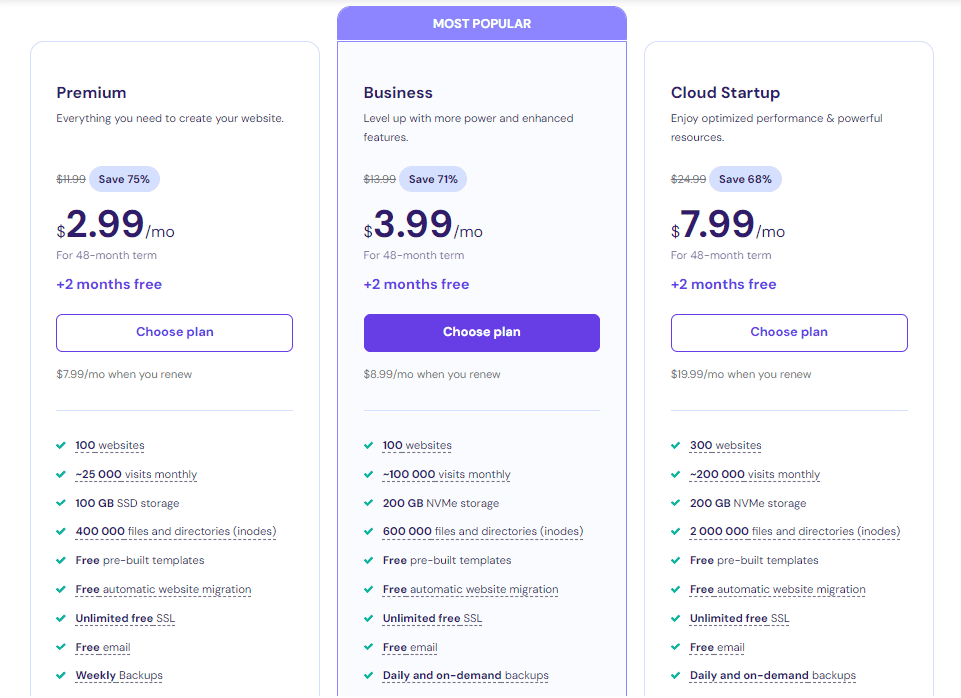
Hostinger is the best web hosting service for beginners. If you are looking for fast and reliable hosting at an affordable price, Hostinger is a great option. You get cheap hosting starting at $1.99 per month if you pay for multiple months. Their WordPress hosting is also very affordable, starting at $1.99 per month for the first term, with renewal pricing as low as $10.99 per month.
One great thing about Hostinger is that you get free SSL from Let’s Encrypt for one site built into the plan, even for the entry-level plan. You get weekly backups for the entry plans and daily backups for the premium plan.
Hostinger is also working on a staging tool that lets you test changes before you deploy, with a single click. You get fast, responsive SSD storage, as well as Git and SSH access, in some plans.
Check Hostinger Plans for Beginner Websites
Pros
- Budget-friendly pricing and strong overall value.
- Easy, beginner-friendly control panel (hPanel) and AI tools.
- Global data centers and fast load times.
Cons
- Renewal prices jump notably after the first term.
- No standard cPanel (uses hPanel), a preference issue for some admins.
- Entry plans aren’t ideal for very demanding/high-traffic sites.
2. Liquid Web – Best for eCommerce and Enterprise
Liquid Web is known for high-performance VPS, Dedicated Server, Cloud hosting, and Cloud GPU. However, Nexcess, the WordPress and eCommerce hosting arm that offers easy-to-use, fully managed web hosting solutions for WordPress, Magento, and WooCommerce, has now been added to Liquid Web, bringing all hosting services together for easier access.
This means that in addition to its fully customizable VPS and dedicated server hosting with root access, Liquid Web now offers fully managed hosting for WordPress, WooCommerce, and Magento.
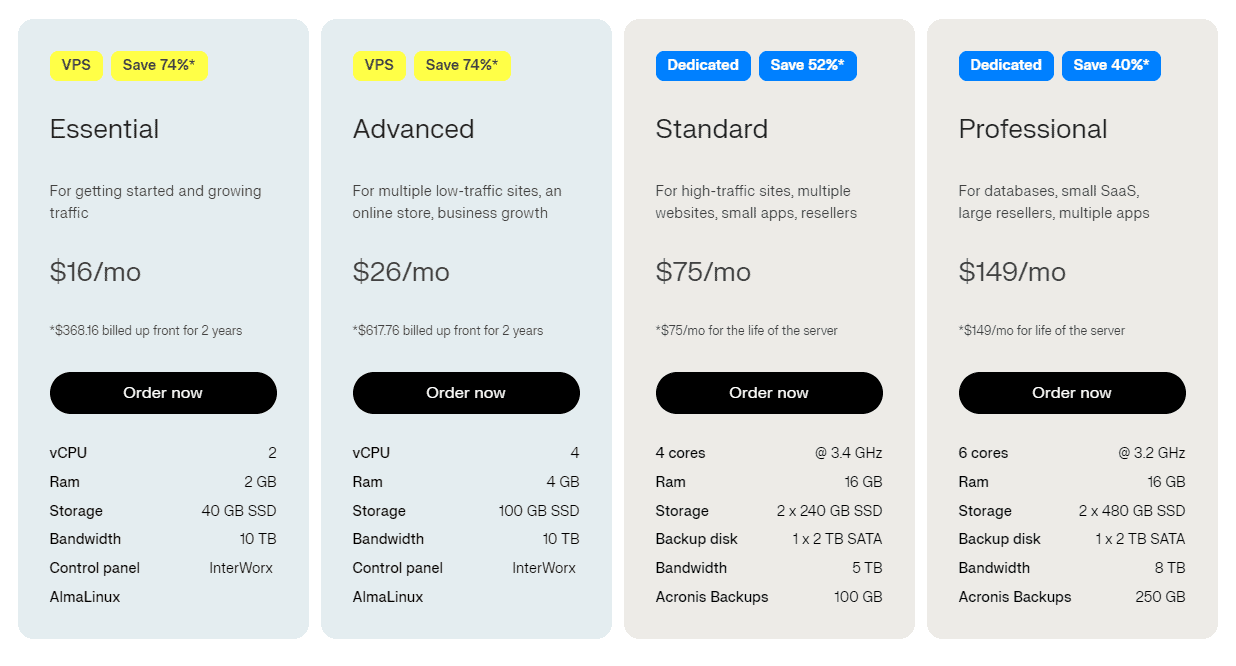
Need a reliable and highly customizable dedicated server with a fully managed option? Liquid Web is a great choice. The company offers both traditional dedicated servers and cloud-based servers.
Liquid Web boasts 99.999% uptime on its VPS and Dedicated server solutions and 100% uptime on its managed server solutions. This is one of the best web hosting services for small and medium-sized businesses, agencies, large businesses, and corporations.
Compare Liquid Web Managed Hosting Plans
Pros
- Enterprise Grade Servers
- 99.999% or even 100% uptime guarantee
- Premium managed hosting (VPS/dedicated/cloud/WordPress/WooCommerce/Magento) with top-tier support and uptime.
- Transparent Pricing.
- Strong for agencies/eCommerce/mission-critical workloads (compliance options).
Cons
- Starting prices are a bit higher than budget hosts.
3. InMotion – Best for VPS Hosting
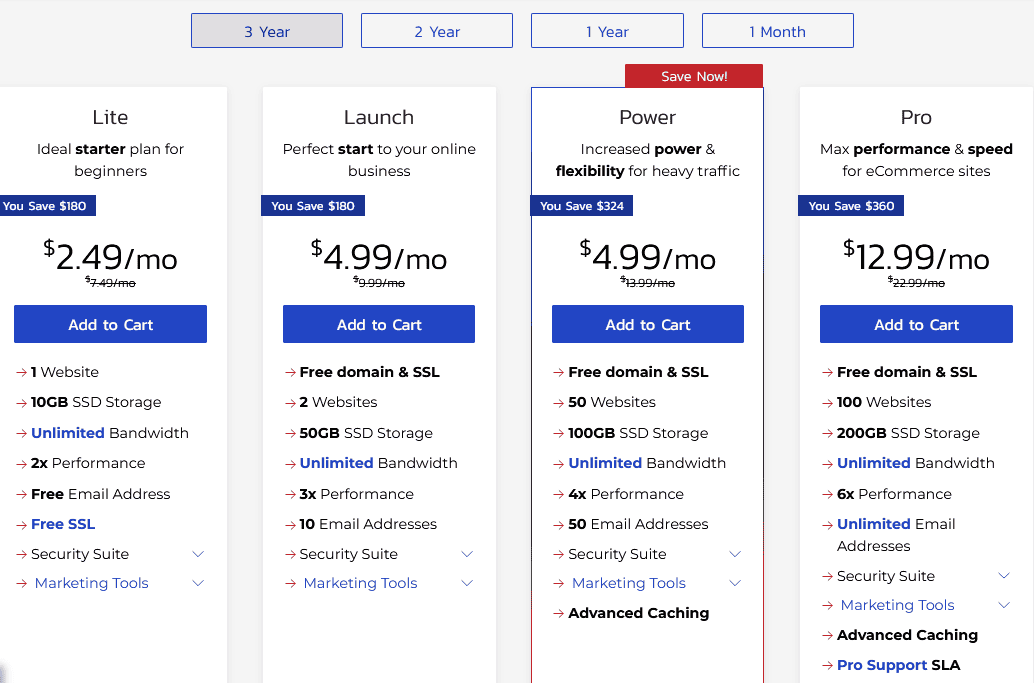
InMotion is one of the top-rated hosting companies to consider for your next project or if you are looking for a good service for your existing project. The service promises a 99.99% uptime and free SSL certificates and site builder.
The entry-level plan starts at $2.29 per month (3-year term) for the first term and costs $9.99 per month on renewal.
InMotion offers outstanding speed and performance, thanks to its superfast servers and fast SSD storage. They offer you the choice of server locations in the United States or Europe, enabling you to choose a server that is closest to the majority of your customers.
InMotion also offers support for Python, Ruby, Node.js, and Git version control.
See InMotion VPS Hosting Options
Pros
- Excellent value/performance for VPS; responsive 24/7 support.
- Extended 90-day money-back guarantee on many plans.
- NVMe storage and robust security features across tiers.
Cons
- Best pricing requires longer terms; renewals rise.
- Primarily, offering U.S. data centers. Latency can be higher for non-U.S. audiences. This can be remedied with Cloudflare.
4. Tiger Technologies
Most web hosting review websites hardly mention Tiger Technologies, but I have to mention them here because this tech blog is hosted on Tiger Technologies.
Since I host some of my less popular websites with hosting services that frequently appear in these hosting reviews, I am well-positioned to say that Tiger Technologies more than deserves a place on a list of the best web hosting for WordPress.
Their servers are fast, with fast response times and high availability. It is also cost-effective with top-notch customer service. My current plan (Business 150 Plan) costs $30.95 per month. You pay $28.95 per month if you pay for a full year. Tiger Tech also offers more affordable plans, such as Basic Hosting at $10.95, Plus Hosting at $14.95, and Business Hosting at $19.95.
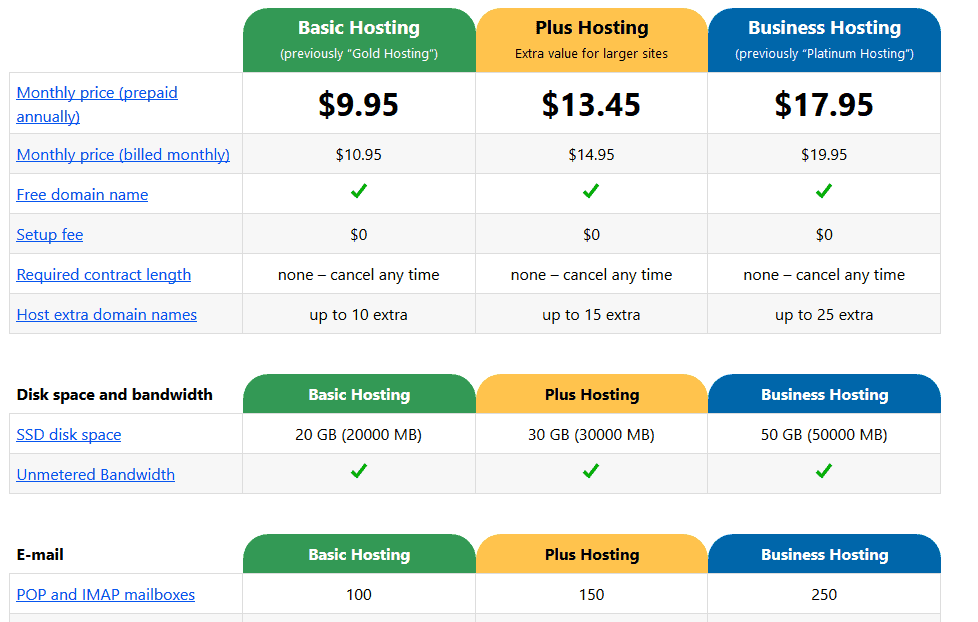
Tiger Technologies is built with WordPress in mind. You get a link to a one-click WordPress install, making setup quite easy. One thing that worries me about Tiger Tech is the UI. It is too simplistic, just a collection of links as seen below:
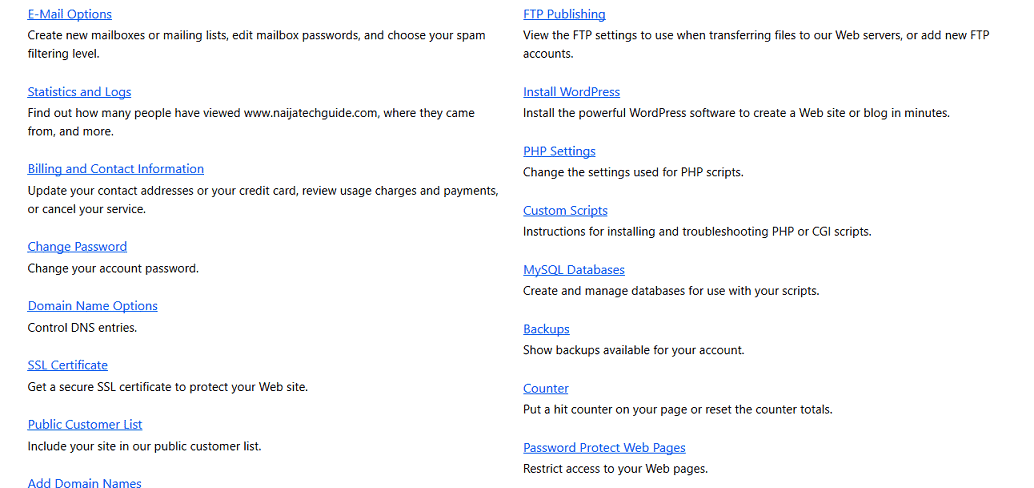
Despite looking very simple, I consider Tiger Technologies one of the best web hosting providers for WordPress.
Pros
- Straightforward shared plans with SSD storage, unmetered bandwidth, and daily full backups.
- Free domain, wildcard SSL, WHOIS privacy; month-to-month billing available.
- Public status page.
Cons
- Higher entry price than mass-market budget hosts.
- Limited product catalog (shared hosting focus; no VPS/dedicated/cloud).
5. Namecheap – Best Cheap Hosting
Namecheap delivers surprisingly strong performance without breaking the bank. It is one of the best web hosting services if you are looking for a sub-$5 hosting service. Despite the affordability, testing shows it offers more than just a low price tag. For personal blogs, small business sites, and portfolio projects, Namecheap’s hosting provides a reliable foundation that often exceeds expectations for its cost bracket.
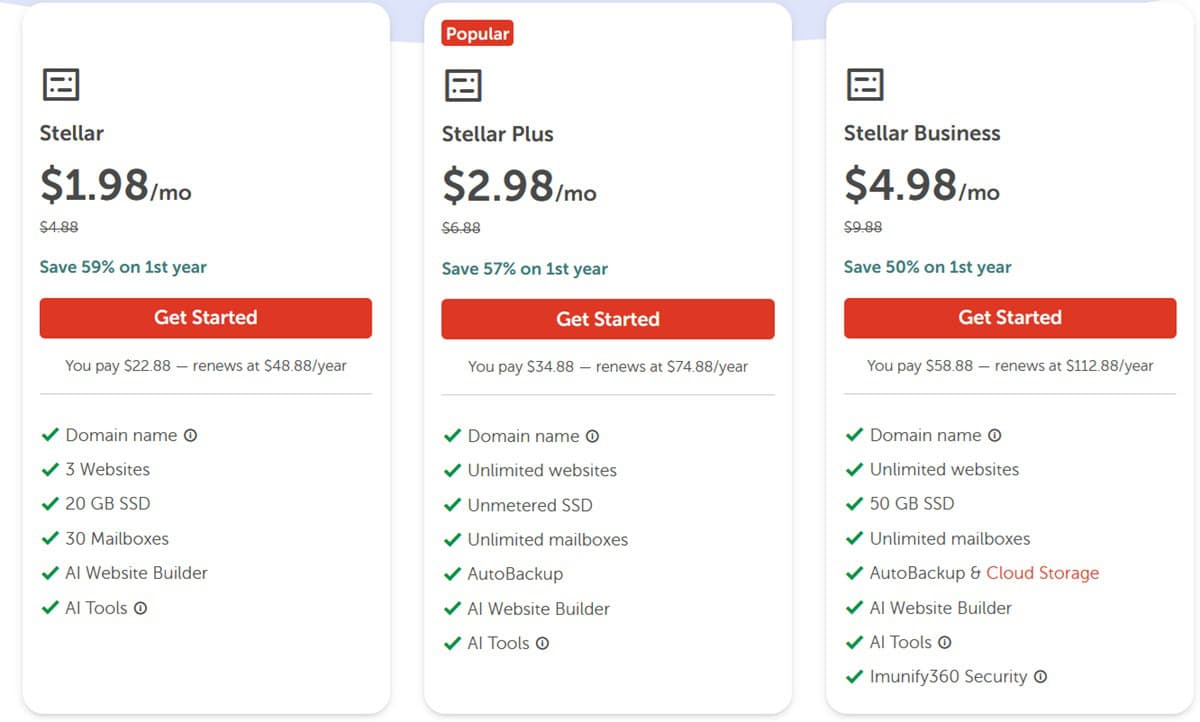
The entry-level shared hosting plan starts at $1.98 per month and renews at $4.88 per month. You get robust features like free SSL certificates and a user-friendly dashboard for a very accessible price.
View Latest Namecheap Hosting Deals
Pros
- Exceptional Price-to-Performance Ratio.
- User-friendly dashboard for a very accessible price.
- The inclusion of a pre-installed caching plugin on EasyWP plans further helps boost site speed
Cons
- Renewal prices are typically more than double the initial promotional cost.
6. Bluehost Hosting
Bluehost is one of the best web hosting companies. It starts at $2.95 per month ($9.99 after the first term). The shared hosting plan is great for an average website or blog, but if you want more scalability, the Managed WordPress plan is a great option starting at $9.95 on the first term and $19.95 on renewal.
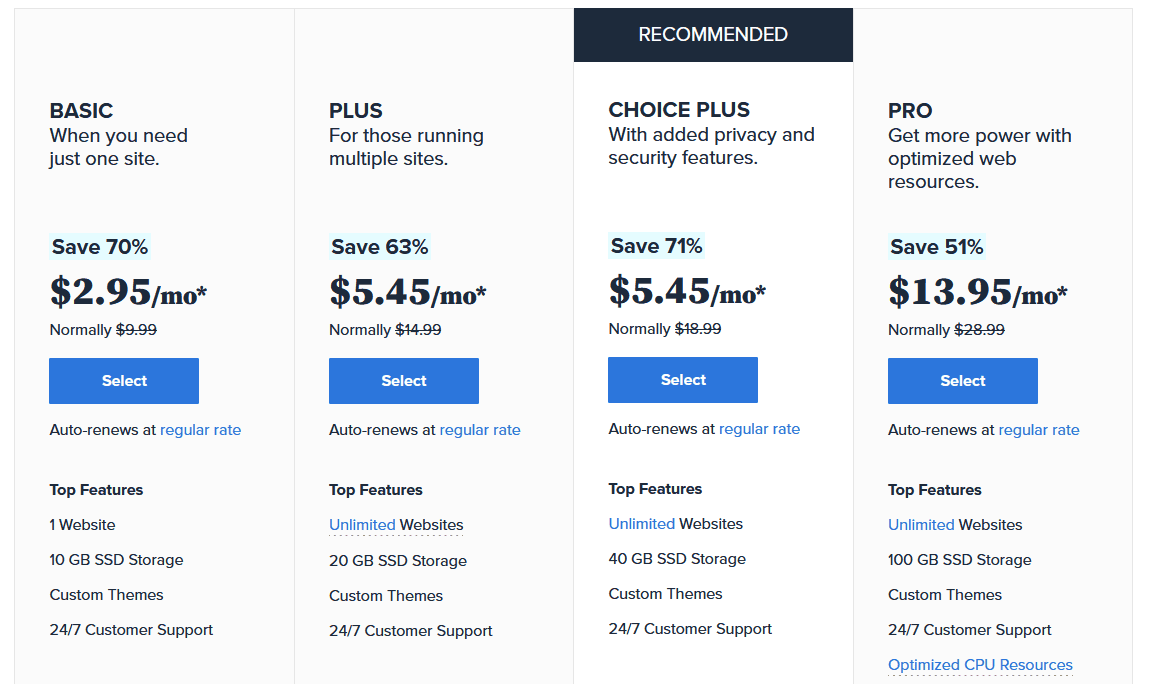
If you are looking for a reliable hosting company to host your blog or small business website, Bluehost is a great option. On Bluehost, your website or blog is hosted on a fast and reliable server, ensuring your site is always available and loads fast.
Pros
- Easy WordPress setup and beginner-friendly dashboard; widely recommended for WordPress.
- Recent global data-center expansion aimed at lower latency and faster loads.
- Broad plan range (shared, VPS, dedicated, cloud) with decent performance.
Cons
- Renewal rates can be noticeably higher than intro pricing.
- Performance can slow down under heavy spikes on entry-level shared.
- Support experience isn’t always top-tier.
7. HostGator Hosting

HostGator is a household name in the world of Web Hosting. The service hosts over 10 million domains, making it one of the most popular in the world.
The company offers a wide range of plans, from standard hosting to WordPress Cloud Hosting, a managed WordPress Hosting optimized for WordPress, as well as VPS and Dedicated Servers. HostGator has one of the best cloud hosting options if you are looking for affordable options.
This provider boasts fast load times. Price starts at around $10.95 per month (as low as $2.95 for the first term) to up to $16.95 for the top-of-the-line plan.
Pros
- Very beginner-friendly setup (cPanel, one-click installs) and 24/7 support.
- Decent uptime and respectable speed
- Affordable promos with free domain/SSL on many shared plans.
Cons
- Security/backups and some advanced tools are paid add-ons.
- U.S.-only Servers.
- Customer support quality can be inconsistent.
8. GoDaddy Hosting
GoDaddy offers one of the best web hosting providers for beginners, with 99.9% uptime. Price starts at $6.99 per month (12-month term) for the first term for the entry-level plan and $18.32 per month when you renew. GoDaddy also offers over 150 apps to enable you to build your website, blog, or forum.
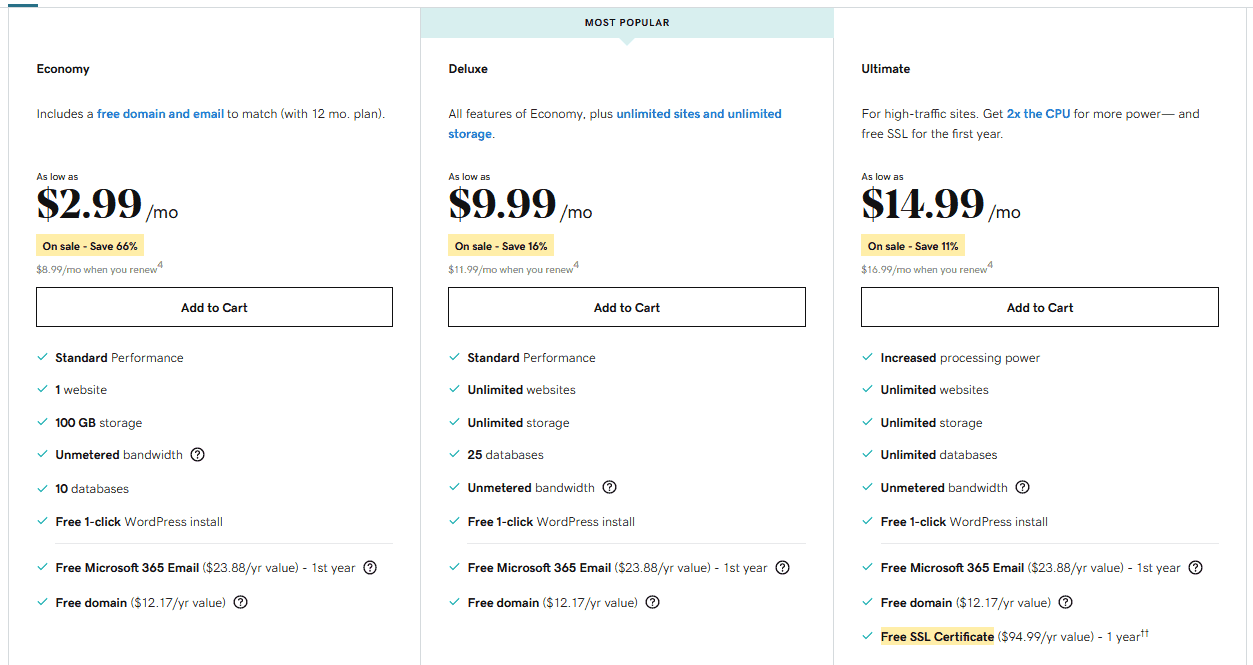
You also get a free domain name for the first year. The company also offers a managed WordPress solution optimized for WordPress. You get fast and secure hosting with daily backups. Price starts at $10.99 per month for the entry plan and $17.99 for the Ultimate plan.
Pros
- One-stop shop (domains, email, builder) with broad plan choices.
- Reliable uptime and fast server response.
- Free domain/SSL on many plans and extensive 24/7 support options.
Cons
- Often pricier when add-ons are considered.
- Backups/advanced features vary by tier.
- Upsells are common.
9. SiteGround Hosting
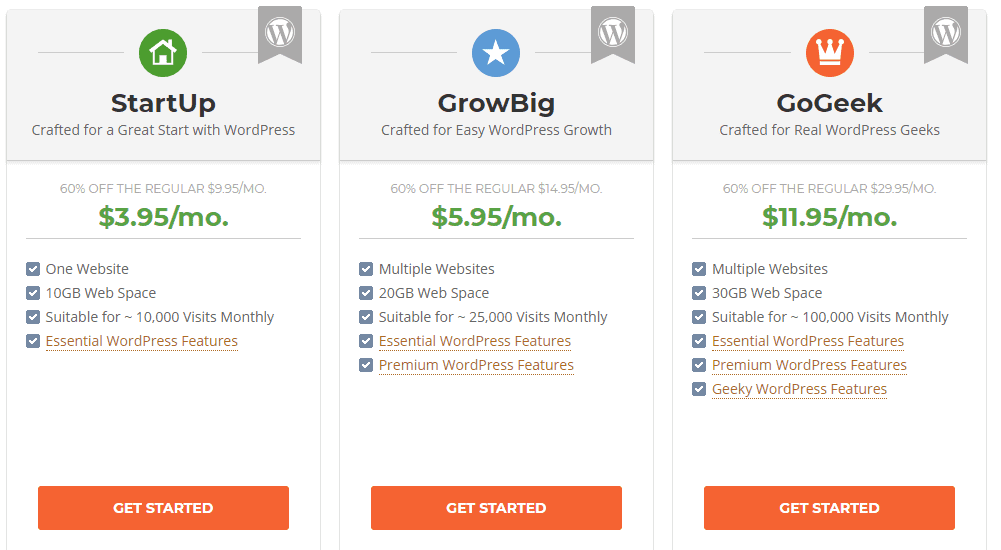
SiteGround is one of the best web hosting providers for WordPress. The service is fast, secure, and built from the ground up for WordPress. Runs on Google Cloud with proprietary speed tech (Ultrafast PHP, dynamic caching), daily backups, and security.
Price starts at $3.99 per month and goes up to $39.99 per month for the top-of-the-line plan. Like most hosting plans, you pay a discounted rate for the first term.
Pros
- Excellent performance/uptime on Google Cloud with strong caching/security.
- Useful dev features (staging on GrowBig/GoGeek), polished control panel.
- Global data-center choices and responsive support.
Cons
- Renewal prices jump sharply after the intro term.
- Limited Storage Space in Entry Plans.
10. InterServer
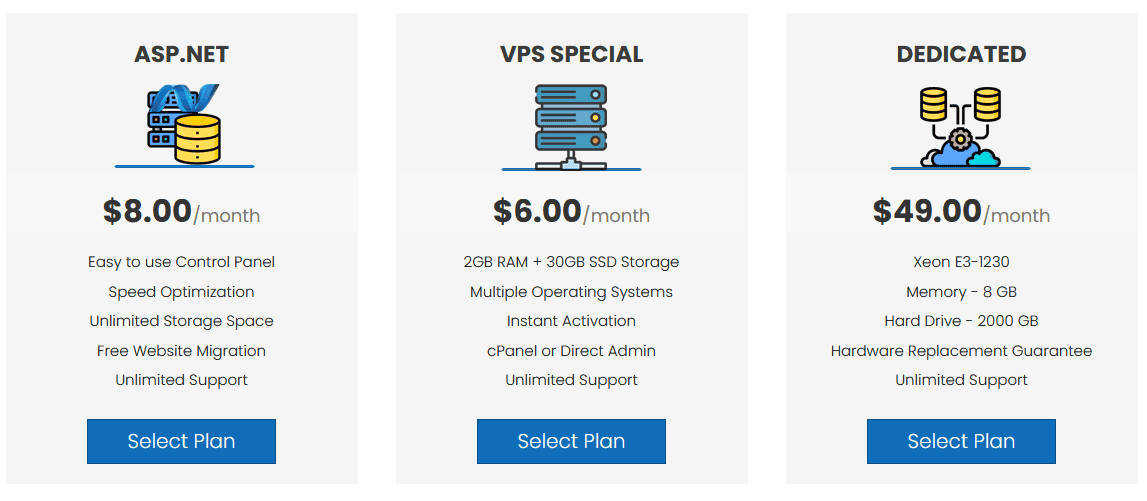
InterServer is a versatile provider offering both standard and ASP.NET hosting. The company also offers managed WordPress and Cloud VPS. The Price starts at $2.50 per month for the standard plan for the first term. Renewal will cost $6 per month. ASP.NET starts at $8 per month.
You get speed and reliability, along with free SSL certificates.
Pros
- Hosting Plans are Budget-Friendly
- Free Cyber Attack Protection on some plans
Cons
- Servers located in the United States can make the website slow if most of your audience is outside the U.S.
Highlighted above are some of the best web hosting services for building websites and blogs in 2026. Most of these web hosting sites are also great for building websites on WordPress. However, if you are specifically looking for hosting solutions that are optimized for WordPress, check out our recommendation on the Best WordPress Hosting.
You may also be interested in the Best WordPress Plugins.
Best Web Hosting by Use Case
| Use Case | Best Option |
|---|---|
| Personal blog | Hostinger / Namecheap |
| Small business website | Hostinger / SiteGround |
| WordPress website | Bluehost / SiteGround / Tiger Technologies |
| WooCommerce store | Liquid Web / Nexcess |
| High-traffic blog | Liquid Web / Cloudways / Kinsta |
| Developer project | DigitalOcean / Vultr / InMotion VPS |
| Budget website | Namecheap |
| Agency hosting | Cloudways / Kinsta / Liquid Web |
| Static website or frontend app | Vercel / Netlify / Cloudflare Pages |
Looking for the Best Web Hosting in Nigeria?
Most of the hosts above have their servers in the US or Europe and bill in US dollars, which is fine for a global audience but raises questions about latency and Naira payment if your visitors are mainly in Nigeria.
If that’s you, we’ve covered it in depth, including local hosts that let you pay in Naira, and when an international host plus a free CDN is the smarter choice, in our dedicated guide to the best web hosting companies for Nigeria.
What is a Web Hosting Company
A web hosting company is a service that enables an individual or organization to host a website on a server connected to the internet. The website content (HTML, code, images, videos, links, etc.), organized into pages, is stored so that it is accessible via internet browsers using the respective web address assigned to each page. This blog, for example, is hosted on Tiger Technologies.
The best hosting providers offer different types of hosting, such as shared hosting, Managed WordPress hosting, cloud hosting, VPS Hosting, and Dedicated servers.
If you are working on a project that requires high-level customization and flexibility, check out our recommendations for the best dedicated server hosting.
Another way to go is a virtual private server, VPS. Here are some of the Best VPS Hosting to choose from.
Types of Web Hosting Explained
Before you pick a host, it helps to know what kind of hosting you actually need. Most providers on this list sell several types, and the right one depends on how big your site is, how much traffic you expect, and how much of the technical side you want to handle yourself. Here, we look at the main options, from the cheapest to the most powerful.
Shared Hosting
In shared hosting, your site shares a single server and its resources with many other websites. It is the cheapest option and the easiest to start with, making it the right choice for most blogs, portfolios, and small-business sites. The trade-off is that a traffic spike on a neighboring site can occasionally slow yours down. If you are launching your first website, this is almost certainly where to begin.
VPS Hosting
A virtual private server still sits on a shared physical machine, but your site gets its own walled-off slice of guaranteed resources. You get more power, more control, and the ability to install your own software, in exchange for a higher price and a little more technical know-how. It is the natural next step when a growing site starts to outgrow shared hosting. Hosts like Liquid Web and InMotion are known for strong VPS plans.
Cloud Hosting
Instead of running on a single machine, your site runs across a network of connected servers. If one fails, another takes over, and you can scale resources up or down on demand, paying for what you use. That makes cloud hosting a good fit for sites with unpredictable or fast-growing traffic that need to stay online no matter what. It usually costs more than basic shared hosting but offers far better reliability and flexibility.
Dedicated Hosting
You rent an entire physical server for your site alone, with all of its resources at your disposal. This delivers the highest performance and the most control, which suits large, high-traffic websites, busy online stores, and enterprises with serious requirements. It is the most expensive option and generally assumes you have technical staff, though fully managed dedicated plans (such as those from Liquid Web) handle the heavy lifting for you.
Managed WordPress Hosting
This is hosting tuned specifically for WordPress, with the maintenance taken care of for you, things like automatic updates, built-in caching for speed, daily backups, and tighter security. You pay a premium over plain shared hosting, but you save time and avoid a lot of upkeep. It is ideal if your site runs on WordPress and you would rather focus on content than on server management. Providers like SiteGround, Hostinger, Liquid Web, and Bluehost are popular choices here.
Reseller Hosting
Reseller hosting lets you buy hosting resources in bulk and sell them to your own clients under your own brand. It is aimed at web designers, agencies, and entrepreneurs who manage sites for other people, rather than at someone hosting a single website. If you only need to host your own site, you can safely skip this one.
Not sure which to choose? Most people should start with shared or managed WordPress hosting and upgrade to a VPS, cloud hosting, or dedicated hosting as their traffic grows. For a deeper breakdown of each option, with more examples and guidance, see our full guide to the different types of web hosting.
How to Choose the Best Web Hosting Service
With so many hosts promising fast, reliable, and affordable hosting, the marketing starts to sound identical. The way to cut through it is to judge every host against the same short checklist. Here are the factors that actually matter, roughly in order of importance for most websites.
Uptime and Reliability
Uptime is the share of time your site stays online, and it is the single most important thing a host sells. Look for a guarantee of at least 99.9%, and treat anything lower as a warning sign. Better still, judge a host on measured uptime rather than the promise on its sales page, since the two do not always match.
Speed and Performance
A slow site loses visitors and ranks worse in search. Favor hosts that use modern hardware such as NVMe SSD storage, offer caching, and let you choose a server location near your audience. If your host’s servers sit far from your visitors, a content delivery network like Cloudflare can close much of the gap.
Pricing, intro vs renewal
The headline price is almost always an introductory rate for your first term, and it usually rises sharply on renewal. Before you commit, find the renewal price and base your decision on that, not the discount. Paying for a longer term up front keeps the lower rate locked in for longer, which often works out cheaper overall.
Customer Support
Sooner or later, something will break, and good support is what gets you back online quickly. Check that help is available 24/7, across channels you will actually use, such as live chat, and ideally test response times yourself before you rely on a host for anything important.
Ease of use
If you are not a developer, a clean control panel and a one-click WordPress install make a real difference. Beginner-friendly hosts get you from sign-up to a live site with far less friction, which matters more than a long feature list you will never touch.
Room to grow
Pick a host you will not outgrow in a year. The best providers let you start on affordable shared hosting and move up to VPS, cloud, or dedicated plans on the same account as your traffic increases, so you are not forced to migrate elsewhere just when your site is doing well.
Backups and Security
Free SSL certificates should be standard on every plan today, and the strongest hosts also include automatic backups, malware scanning, and an easy way to restore your site if something goes wrong. These features protect both your data and your visitors’ trust.
Money-back guarantee
A solid refund window, commonly 30 days and sometimes longer, lets you try a host risk-free and walk away if it does not deliver. It is also a quiet sign that the company is confident in its own service.
The bottom line: start by matching the hosting type to your needs, then weigh uptime, speed, true cost, and support before letting price alone decide. For a more detailed step-by-step walkthrough, see our complete guide on how to choose the right web hosting.
Common Web Hosting Mistakes to Avoid
Choosing a host is easy to get wrong, and the cost of a bad decision is a slow, unreliable site or hours wasted migrating to a better one later. Most of these mistakes are simple to sidestep once you know to watch for them.
Choosing based on the introductory price alone
This is the biggest and most common mistake. That tempting first-year rate almost always jumps on renewal, sometimes to three or four times the price. Always check the renewal cost before you sign up, and judge the host by what you will actually pay in the long term, not by the discount.
Going for the cheapest host, no matter what
Rock-bottom pricing usually means overcrowded servers, slow load times, patchy uptime, and thin support. For a site that matters to you, paying a little more for a reliable host is far cheaper than the traffic, sales, and ranking you lose to downtime and slow pages.
Ignoring uptime and reliability
It is easy to focus on price and features and forget the one thing hosting exists to do: keep your site online. Skipping the uptime guarantee, or taking it on faith, is how people end up with a site that disappears during their busiest moments. Look for at least 99.9% and, where you can, real measured uptime.
Not testing customer support first
Many people only discover how bad their host’s support is in the middle of an emergency. Before you commit, send a pre-sales question via live chat and see how quickly and helpfully they reply. A host that is slow to answer a sales query will not be faster when your site is down.
Buying the wrong amount of resources
This cuts both ways. Some people overpay for a powerful VPS or dedicated plan when shared hosting would suffice; others cram a fast-growing site onto an entry-level plan it has long outgrown. Match the plan to your actual traffic and content, and pick a host that lets you upgrade easily as those change.
Assuming the host handles your backups
Not every plan includes automatic backups, and even when it does, relying on a single copy on the same server is risky. Confirm what your host backs up and how often, and keep your own independent backup of anything you cannot afford to lose.
Overlooking the server location
A host with servers far from your audience adds delay to every page load. If most of your visitors are in one region, choose a data center near them, or put a content delivery network (CDN) in front of your site to serve pages from closer locations.
Locking into a long-term without testing
Long contracts secure the lower price, but committing for years before you have tried the service is a gamble. Use the money-back guarantee as a genuine trial: set up your site, test the speed and support within the refund window, and only settle in once the host has proven itself.
Misreading “unlimited” plans
“Unlimited” or “unmetered” storage and bandwidth are rarely truly limitless. They are governed by fair-use terms, and a site that consumes too much can be throttled or asked to upgrade. Read the terms of service so you know where the real limits sit before you rely on them.
Avoid these, and you have sidestepped the problems that send most people host-hunting a second time. If you want a positive checklist to compare hosts against, see our guide on how to choose the right web hosting.
Frequently Asked Questions
Which is the best web hosting service overall?
Hostinger is our top overall pick for 2026. It combines low introductory pricing, a beginner-friendly control panel, free SSL, and global data centers, which makes it the best all-around choice for most new websites and blogs. Liquid Web is the stronger pick if you run a serious eCommerce store or need enterprise-grade performance.
Which web host is the cheapest?
Namecheap has the lowest entry price on this list, starting at $1.98 per month, with Hostinger close behind when its shared-hosting deals are running. Remember that the lowest introductory price is not always the best over two or three years, because renewal rates are usually much higher than in the first term.
Why is the renewal price higher than the price I signed up for?
Most hosts advertise a discounted introductory rate for your first billing term and then charge a higher standard rate when you renew. This is normal across the industry. Before you sign up, always check the renewal price, not just the headline figure, and consider paying for a longer term to keep the lower rate for as long as possible.
Why Consider WordPress Hosting?
WordPress is the most popular platform for building websites and blogs. If you are thinking of building a website or starting a blog in 2026, WordPress is very likely at the top of your list. As a result, many web hosts now offer WordPress-optimized hosting. Traditional Web Hosts like BlueHost and HostGator now offer cloud hosting optimized for WordPress. You also have services like Liquid Web, SiteGround, and Tiger Technologies that have services built from the ground up for WordPress.
Do I need special WordPress hosting?
Not necessarily. WordPress runs well on ordinary shared hosting, and most hosts here offer one-click WordPress installs. Managed WordPress hosting adds conveniences like automatic updates, built-in caching, and daily backups, which are worth paying for once your site grows or you would rather not handle maintenance yourself.
Is free web hosting any good?
Free hosting can work for learning or a throwaway test site, but it is a poor choice for anything you care about. You typically get slow servers, forced ads, very little storage, weak support, and no real control over your domain. For a business site or blog, paid hosting starting at a couple of dollars a month is well worth the money.
What does “unlimited” or “unmetered” bandwidth really mean?
It does not mean truly limitless. In most hosts’ terms of service, it means your site can use as much bandwidth as it needs as long as it does not harm performance for other users on the same server. Once you cross that threshold, the host may ask you to upgrade, add a CDN, or improve caching, and may temporarily limit your site. Always read the terms to see how your host handles it.
You may also be interested in Best Black Friday Hosting Deals.
Also, see Best Hosting Deals.
Are you looking for a Reliable Hosting service that will not break the bank? Click Here
That is our list of the best web hosting companies to serve as a guide. We conducted extensive research on their services and considered them the best in the industry.
Web Hosting Related Topics
- Best Content Marketing Tools
- Best Marketing Automation Software
- Increase Website Visitors
- Domain Name Registration
- MTN Data Plan
- Affiliate Marketing
- Best eCommerce Software
- Reasons to Build a Website for Your Business
- Increase Website Traffic
- Unlimited Hosting
- Reseller Web Hosting
- Reliable Web Hosting from GoDaddy




