

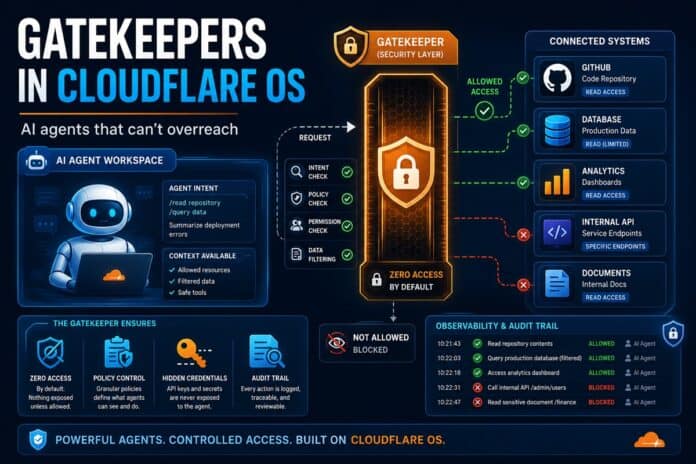
The moment a company gives AI real access to its internal systems, a hard question appears: how do you let an agent do useful work without letting it see or leak everything? When Cloudflare open-sourced Cloudflare OS in August 2026, its answer was a security layer built around what it calls Gatekeepers, which turned out to be the most genuinely novel part of the platform. This is a plain-English guide to how it works and why it matters.
Key takeaways
- Agents start with access to nothing: In Cloudflare OS, every AI agent and app begins with zero permissions and must be granted access to each specific resource.
- Gatekeepers are gatekeepers in the literal sense: a piece of code that sits between the AI and an external system (like GitHub or a database) and enforces exactly what the agent can see and do.
- The credential is never handed to the AI: The agent works through a narrow, approved interface; the real API key or token stays isolated.
- An “observation log” tracks everything the agent has seen: This means a report or dashboard built from sensitive data can’t quietly leak that data to people who shouldn’t see it.
- This is a different model from “trust the vendor”: Security is built into the platform, not left to each person building an app to get right.
The problem: Giving AI the keys is dangerous
Anyone who has rolled out AI at work has seen the pattern. People quickly discover that an AI assistant is not much use for real work unless it can reach the systems they use every day: the code repository, the customer database, the analytics warehouse. So they ask for API keys.
Handing over API keys does not scale, and it is risky. Keys typically grant broad, long-lived access that is hard to narrow down, hard to share safely, and hard to audit after the fact. Give an agent a GitHub key and, in most setups, you have given it your entire GitHub account.
The Model Context Protocol (MCP), the emerging standard for connecting AI to tools, improves on this. An MCP server can hold the credential and expose only a defined set of tools, so the agent never touches the raw key.
But Cloudflare found that MCP alone solves only half the problem. Knowing which tools an agent is allowed to call tells you nothing about which underlying data it actually saw. An agent can combine information from several systems, move it somewhere less protected, or surface it through an app to someone who was never allowed to see the original.
Real authorization, Cloudflare argues, has to account for where the data can travel next, not just the first request.
Cloudflare OS was rebuilt around exactly that insight. Here is how the pieces fit together.

Agents start with zero access
In Cloudflare OS, Cloudflare Access decides who can enter the platform at all. But once inside, every agent and every app starts with access to nothing. It has no keys, no connections, no reach into any system.
When an agent needs something, it has to ask for access to a specific resource, and a human can grant or deny that request. When access is granted, the agent’s generated code receives the resource as a typed “binding,” a controlled handle to that one resource under that one policy. In practice, the code an agent writes might call something like:
const issues = await env.PROJECT.listIssues({ teamId: "ENG", state: "open" });
Here, env.PROJECT is a capability: permission to use one specific resource, in one specific way. Crucially, the actual credential behind it stays completely isolated from the agent and from any code it writes. The agent uses the door without ever holding the key.

Two more guardrails sit underneath. The agent’s server-side code runs in an isolated Cloudflare Worker with outbound internet access switched off, and its client-side code runs in a sandboxed frame in the browser. Neither can reach the wider internet except through the capabilities you explicitly hand it. An agent cannot quietly phone home.
What exactly is a Gatekeeper?
A Gatekeeper is a small, service-specific program, technically a Cloudflare Worker, that sits between Cloudflare OS and an external system such as GitHub, a database, or an internal API. It understands that particular service: its resources, its operations, and the rules that should apply to them.
The GitHub example makes it concrete. Rather than giving an agent your whole GitHub account, a Gatekeeper can:
- limit it to a single repository;
- allow it to read issues but not the source code;
- mask specific fields it shouldn’t see;
- apply rate limits so it can’t hammer the API;
- and require human approval before it merges a pull request.
To the agent, all of this appears as a small, simple interface. Behind the scenes, the Gatekeeper does the heavy lifting: it handles the OAuth sign-in, holds the real credential, enforces the policy, records what was read, and mediates anything that has an outside effect. In the most literal sense, it is a gate, and someone (the owner of that system) decides how far it opens.
Cloudflare OS can also connect to MCP servers a company already runs, through a feature called MCP Server Portals, so existing tool integrations don’t have to be rebuilt from scratch.
Policy follows what the agent has seen
Controlling that first read is still not enough, and this is where Cloudflare OS does something most AI tools don’t.
Picture an agent that reads a sensitive table in a data warehouse and uses it to build a live dashboard. The dashboard is useful, so someone shares it with a colleague. The danger is obvious once you see it. Sharing the dashboard must not become a backdoor way to share the underlying table with someone who was never allowed to open it directly.
To prevent this, Cloudflare OS keeps an observation log, a record of every resource an agent has observed. Those observations stay attached to the agent and to whatever it produces.
So when a second person tries to open the workspace, talk to the agent, or view its output, the Gatekeepers check whether that person is allowed to see the resources the output was built from. If they aren’t, the door stays shut.
The same log does one more job. It governs what the agent itself is allowed to do next. Once an agent has read something sensitive, policy can stop it from writing to certain destinations, inviting new collaborators, handing the task to another agent, or making an outbound request, closing the routes by which data tends to escape. The person using the agent doesn’t have to think about any of this or get it right themselves; the platform enforces it.
Why this is genuinely different
It helps to line up the three models side by side.
The API-key approach gives the AI a powerful, hard-to-revoke master key and hopes for the best. Plain MCP is better: the key stays hidden, and the agent only sees approved tools, but it still can’t reason about where data goes after the first read.
Cloudflare OS’s capability-plus-observation model narrows access to one resource at a time, keeps the credential entirely out of the agent’s hands, and then follows the data, checking every downstream viewer and constraining what the agent can do once it has seen something sensitive.
The broader shift is philosophical. In most enterprise AI tools, including the big closed platforms, your data is safe because you trust the vendor’s boundary and their promise not to misuse it.
Cloudflare OS instead tries to make overreach structurally difficult. Agents can’t hold keys, can’t reach the network freely, and can’t launder sensitive data through an innocent-looking output. Security is a property of the platform, not a thing every employee building an app has to remember to implement.
Why this matters for businesses
For banks, fintechs, and any organization handling regulated customer data, this design speaks directly to the biggest hesitation around workplace AI: the fear that an over-eager assistant will see, combine, or leak something it shouldn’t.
A model where an AI agent starts with zero access, where the owner of each system decides exactly what an agent can read or change, and where a report can’t silently expose the table it was built from, is a far easier story to tell a regulator or a board than “we gave the AI broad access and trust it to behave.”
The capability-based approach also fits a practical reality: the person who owns the customer database can open the gate just a crack, for one task, rather than all-or-nothing.
The honest caveat is maturity. Cloudflare OS is open-sourced under the Apache 2.0 license but is still early-access software that Cloudflare itself describes as very capable yet with many rough edges, and under heavy development.
Setting up Gatekeepers for your own internal systems is real engineering work. For a business without that in-house capacity, this is a strong argument for working with a systems integrator and an opportunity for local developer shops to build exactly that expertise.
Frequently asked questions about Gatekeepers
What is a Gatekeeper in Cloudflare OS? A Gatekeeper is a small, service-specific program that sits between Cloudflare OS and an external system. It holds the real credential, enforces what an AI agent can see and do, records what the agent reads, and controls any action with an outside effect.
Do AI agents in Cloudflare OS get my API keys? No. The credential stays isolated inside the Gatekeeper. The agent works through a narrow, approved interface (a capability) and never holds the underlying key itself.
What is the observation log? It records every resource an agent has observed. Cloudflare OS uses it to check that anyone who later views the agent’s output is allowed to see the data behind it, and to limit what the agent can do after reading something sensitive.
How is this different from just using MCP? MCP controls which tools an agent can call but not which data it has actually seen. Cloudflare OS adds capability-based access and the observation log, so authorization also accounts for where data can travel next.
Is Cloudflare OS security ready for production use? Cloudflare labels the platform as early access and under heavy development. The security model is a serious design, but companies should still plan for testing, configuration, and a security review before using it for sensitive workflows.
Conclusion
Most of the AI-workspace conversation is about which model is smartest. Cloudflare OS is making a quieter but arguably more important argument: that the hard part of putting AI to work inside a company is not intelligence, it’s access.
Gatekeepers, capabilities, and the observation log are Cloudflare’s attempt to let agents do real work while making it structurally hard for them to overreach. For regulated, cost-conscious markets, that “can’t overreach by design” promise may end up mattering more than any benchmark score, provided the software matures past its rough-edged early days.




