Nigeria’s Digital Postcode Is Live: The Map Works, Address Search Doesn’t (Yet), and Adoption Still Decides Its Fate

This article was first published four days before launch and then hours before launch. We've rewritten it after testing the live website and the new Android app on October 5. New in this version: how each search option performs, a step-by-step guide to finding a postcode with a Google Maps link, the Android app's features, the new business and developer dashboard, and early feedback from users.

NaijaTechGuide has affiliate and sponsored partnerships and may receive a commission on featured products/services at no extra cost to you. See full Affiliate Disclosure Here
VPN plus Online Security starting at $2.49/mo

Nigeria’s National Digital Alphanumeric Postcode System went live on October 1, 2026, the country’s 66th Independence anniversary. The Nigerian Postal Service (NIPOST) now gives every addressable building an 11-character digital postcode, and you can look yours up at postcode.gov.ng or in the new Android app.

“Everyone in Nigeria has a location. Now every location has a postcode,”

said Postmaster-General Tola Odeyemi at the launch.

Communications Minister Bosun Tijani put it this way:

“Every Nigerian deserves to be found. Every business deserves the chance to reach its customers.”

Before launch, our position was that the technology looked ready and adoption would be the hard part. After testing the live system, we still think so, and we can now be more specific about why.

The map is excellent. The weak link is matching the way Nigerians actually describe places (street names, business names, area names) to the right postcode. Adoption depends on that matching.

We tested the postcode portal; here is what we found

The dedicated postcode website is postcode.gov.ng. The public search page at postcode.gov.ng/find is now live and offers three ways to look up a building. Before launch, only the Use my location option worked. Use address did not work well and has been replaced by Use postcode. Here’s where each one stands now:

location option worked. Here’s where each one stands now:

- Advertisement -Back to School Software Deals
Lookup option Status Our verdict
Use my location (allow your browser or phone to share its location) Live Accurate. It pinpoints your exact building, and street names on the map are correct.
Use map link (paste a Google Maps link) Live (Site only) Works well. It zoomed straight to the right building every time we tried it.
Use address (type an address, place, alias, or a postcode) Replaced with Use postcode Typing a postcode works well. Typing an address often fails.
Use postcode (type a postcode) Live Type a postcode to see the building it belongs to on the map.

You can also find postcodes in the Android app, currently available on the Google Play Store. The Use map link option isn’t available in the App.

In the Android App, you can use the Use my location function by tapping the Find Postcode button on the Home screen. Tap on the Search icon to open the search screen where you can enter a place or alias to find the postcodes of buildings around a place or the postcode associated with the alias.

Searching for a postcode shows the building with that postcode on the map.

Find the postcodes for Buildings near you

The default interface for finding postcodes on the site is the Use my location tab. In the Android app, you can access this option by tapping the Find Postcode button on the home screen.

- Advertisement -Prepaid eSIM in over 200 Destinations

This option shows the postcodes of buildings near your current location. However, you will need to grant the browser or app location permission so that it can pinpoint your location accurately.

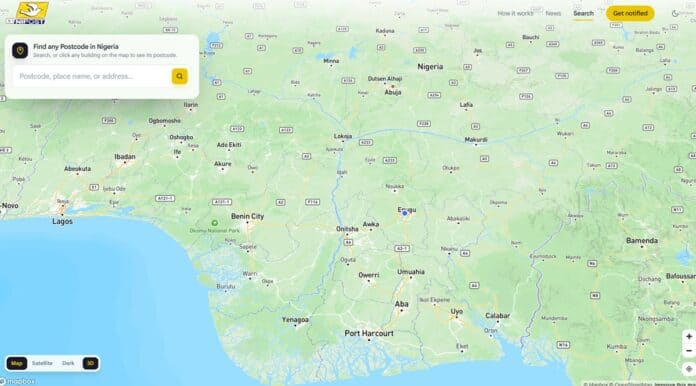
This zooms in the map to the buildings near your current location with the last 4 digits of their postcode on top of each building. An information panel on the side of or below the map shows the first 9 digits common to the cluster of buildings near your current location.

Identify the building you want to find the postcode for, then tap or click it to reveal the complete postcode. This also reveals the building’s official address, if it has one. Tapping or clicking on any of the other buildings around also reveals their postcode.

I could identify my building on the map. Notably, the street names on the map were accurate, which Nigerians aren’t used to seeing on digital maps of their own neighborhoods.

In our initial pre-launch test, four days before launch, the search page offered map, satellite, and dark mode in 3D and 2D views (Map mode in 3D view was the default as of our testing). However, in tests conducted hours before launch and in the latest test, the default is the satellite mode in 2D view, with the only other option being map mode in 2D view.

I prefer the map mode; it is clearer for identifying buildings on the map than the default satellite mode.

Find the postcode for a Building using its Google Maps link

During our initial tests days and hours before the launch, the Use map link option was not active. However, it is currently the most dependable way to find the postcode for a building you aren’t standing in. Here’s how to do it:

  1. Open Google Maps and find the building.
  2. Tap or click the building to select it.
  3. Tap Share and copy the link.
  4. On postcode.gov.ng/find, choose Use map link and paste the link into the search bar.
  5. Click the Find postcode button. The map zooms to that location and shows the building’s postcode.

It’s useful for finding the postcode of a relative’s home, a shop you’re sending a parcel to, or an office you’re visiting for the first time. This option is not currently available on the App as of the time of the latest update to this article.

“Use address” is where the system still falls short

We expected to type a street name, a business name, or a well-known area and see the postcodes of nearby buildings. That mostly didn’t happen.

Some searches said no postcodes existed for an area, even though we could confirm a building’s postcode there with the map-link method.

In one test, we copied the exact physical address the system itself had attached to a postcode found through a Google Maps link and pasted it into address search. It still came back with: “No postcode matches that address yet. Try fewer words, such as the street and the area.”

The postcodes are there. The address search just can’t link everyday descriptions of a place to them yet.

One part of address search does work very well: searching by postcode. Type in an 11-character code, click Find postcode, and the map zooms to the exact building.

That matters, because it helps the people on the receiving end, such as delivery riders, visitors, and emergency responders, who are given a postcode and need to find the place.

In our latest test, NIPOST has replaced the Use address tab with the Use postcode tab on the site. Though the search bar on the App still says “Search postcode, place, or alias”, any search other than a postcode is unresponsive. Perhaps NIPOST should clean this up to just “Search postcode” until they are ready to return search for addresses, aliases, and places.

Find a Building on the map with its postcode

Click the Use postcode tab, enter the postcode, then click Find postcode to show the building with that postcode on the map.

This is a great option when you are visiting a person. Ask for their postcode, use it to find their building on the map, and use the Direction button to find your route from your current location to their address.

It will also be popular with dispatch riders and emergency responders.

The Android app is out; iOS is still coming

NIPOST’s postcode app is now on Android. The iOS version hasn’t been released yet.

Text search works a little better in the app, because it suggests results as you type. The same matching problem remains, though. Most of the addresses we tried still didn’t return a postcode. As far as we can tell, the postcodes exist; the app just can’t connect the address or place name to them.

The app does well on everyday use:

  • Copying and sharing postcodes straight from the map is quick, so you can drop your code into a WhatsApp chat or a delivery form.
  • Saving postcodes works once you create an account and log in. You can label saved codes Home, Office, and so on, so you know which is which.
  • Directions are built in. Just click Directions, and it will draw a route from where you are now to the building with that postcode. Postcodes still work alongside other map apps.
  • You can correct incorrect details using the Edit option. You can fix the address, structure type, building use, ownership, and photos. NIPOST says submitting takes about two minutes, and reviews take around 48 hours.

NIPOST had also promised USSD access for people without smartphones. We didn’t find a USSD code on the official site or in its FAQ at launch. That matters for rural users and for anyone without data.

Early users report mixed results

We weren’t the only ones getting mixed results. In the first day of public feedback collected by Nairametrics, several users called the system “insanely accurate” and “simple and fast.” Others reported:

  • the same postcode showing on neighboring houses,
  • their home not appearing in results, with nearby buildings suggested instead,
  • no coverage yet in parts of Oyo State, which led one user to suggest the system was “only meant for the urban areas.”

Minister Tijani advised users to “make sure your phone’s location is switched on” before searching. NIPOST pointed people with wrong details to the in-app edit function.

Before launch, it said it expected to cover more than 90% of the country by October 1 and achieve full coverage across all 36 states and the FCT by December 2026. The gaps people are reporting fit a rollout that’s still filling in, so the December target is the one to hold NIPOST to.

Businesses and developers can now build on it

The biggest change from our pre-launch article is here. We listed the missing developer portal as a key hurdle. It’s now open.

A new dashboard is available at dashboard.postcode.gov.ng/register, alongside the existing postcode.gov.ng/integration interest form. NIPOST says organisations can use it to:

  • verify customer and merchant addresses, which is the KYC use case banks and fintechs have been waiting for,
  • look up any building’s postcode,
  • put their business on the map under its own name through a postcode alias.

A postcode alias links a name people recognize to an existing postcode, for example, a business name to its building’s code. It doesn’t create a new postcode. NIPOST says that if a business moves, the alias can follow it to the new building’s code, so customers can still find it by name.

You set up business aliases through the dashboard. You can create general aliases, such as landmarks or community places, in the app. The person creating an alias must be at the location, and NIPOST reviews each one before it becomes searchable.

Developers can create an account, get an API key, and integrate in four ways: a geo-enabled API, web and mobile SDKs, bulk/dataset access, and a government-to-government (G2G) private corridor.

The public documentation at docs.postcode.gov.ng covers Search (autocomplete and nearby places), Lookup (turning a postcode into an address and building details), and postcode-format validation. The SDKs cover web, Flutter, native Android and iOS, and React Native/Expo.

Basic Search and first-level Lookup are free. Deeper lookups need an API key and use credits. NIPOST hasn’t published credit prices yet.

For adoption, this may be the most important development of launch week. Most Nigerians won’t seek out a postcode app. They’ll meet postcodes at a checkout page, in a bank’s account-opening form or in a dispatch app. The tools to make that happen are now available, and the next few months will show which companies use them.

Why the “use address” gap matters so much

Address search sounds like a small feature, but it’s where the old system and the new one meet. People still describe locations by street, area, and landmark, and most business databases do too.

Until the system can reliably turn “144 Oba Akran Avenue, Ikeja” or “the pharmacy by the roundabout” into the right postcode, getting a postcode depends on two things: being at the building, or being comfortable copying a Google Maps link.

That also affects businesses. A bank checking a customer’s address, or an e-commerce platform cleaning up its delivery records, will need address-to-postcode matching to work at scale.

Postcode-to-building lookup is already strong. Address-to-postcode is the half that still needs work. NIPOST’s ability to fix it, and how quickly, will go a long way toward deciding whether this attempt succeeds where the 2009, 2017, and 2018 efforts didn’t.

Why this attempt still looks different

Our pre-launch reasons for cautious optimism still hold, and the launch added to them:

  • Political backing. The Federal Executive Council approved the project in March 2026, and it launched on schedule with the Minister promoting it personally.
  • Existing data. It’s built on the National Population Commission’s 2022 census mapping instead of a fresh survey, and run from a new NIPOST GIS lab.
  • Tested before launch. It was piloted in Bwari (FCT), then ground-tested in a dozen states.
  • Ready for integration from day one. The API, SDKs, and business dashboard went live with the public launch, unlike earlier attempts that never got past being databases.

Here are the previous failed attempts:

Nigeria has used a six-digit numeric postcode since 1986 (Lagos Island’s is 100001), but because street names and house numbers are missing across much of the country, it never became a reliable way to find a specific building.

A push to digitize it first surfaced in 2009, but stalled amid leadership changes. NIPOST then tried narrower fixes. A 2017 partnership with UK location startup what3words, and in 2018, two verification platforms: the Address Verification System and the Digital Addressing System.

By 2020, Google’s own Plus Codes had entered the market with a similar workaround. None produced a nationwide, building-level addressing layer.

Privacy: the question that hasn’t gone away

A national map of every home makes some people uneasy. Some commentators have flagged the risk that this data could be used for surveillance. NIPOST says access is tiered (public, restricted and security-only) under the Nigeria Data Protection Act, with the Nigeria Data Protection Commission overseeing compliance.

NIPOST’s FAQ says a postcode belongs to the building, not to the people in it. Many people can share one postcode, and the code alone doesn’t identify who lives there.

The new API’s tiered lookup levels, where deeper detail needs authorization and credits, are the place to watch. The question is whether those controls hold up as more organizations integrate.

What to watch next

  1. Address-search fixes. This is the clearest sign of whether ordinary Nigerians can find postcodes easily.
  2. The iOS app, and whether USSD access actually launches.
  3. Coverage gaps closing by the December 2026 target, especially outside the big cities.
  4. The first banks, fintechs and logistics firms to announce integrations, and when NIPOST publishes its API credit pricing.
  5. Duplicate-postcode reports getting fixed through the 48-hour correction process.

The real risk isn’t the technology; it’s adoption

NIPOST Postmaster General Tola Odeyemi has been unusually candid about where this project could stumble. She has consistently said that implementation, not engineering, will decide whether the system succeeds, and that the job now is to move Nigerians from simply being aware of the postcode to actually using it.

That’s a telling admission, because Nigeria’s history here is littered with technically sound systems that never achieved everyday use. A postcode is only valuable if the delivery rider asks for it, the bank captures it, the e-commerce checkout has a field for it, and the ordinary citizen knows their code and gives it out. None of that is guaranteed by a working map.

The challenges that will decide the next 12 months

Beyond adoption, several hurdles will determine whether the postcode becomes essential infrastructure or another underused government platform:

Developers can now request API access

The full portal that businesses and logistics platforms need to integrate the postcode appears to be ready. NIPOST is collecting integration requests at postcode.gov.ng/integration.

The public developer documentation is available at docs.postcode.gov.ng. Until banks, e-commerce sites, and dispatch apps integrate it, everyday utility will remain limited.

Rural and low-connectivity reach

The promise to cover rural communities is central to the pitch, and the USSD channel is meant to serve Nigerians without smartphones or data. Whether that access works smoothly in practice remains an open question. The USSD channel is not active as of our latest update.

Privacy and data governance

Linking buildings to precise coordinates and potentially to identity via NIN raises obvious concerns.

NIPOST says access is tiered under the National Data Protection Commission, with public, restricted, and security-only levels, and that the Federal Republic owns the data through NIPOST. How firmly that line holds once agencies and companies start integrating is worth watching.

Consistency across wildly different terrain

The system deliberately uses different mapping models for different states, since dense areas like Lagos’s Mushin behave nothing like Abuja. Keeping accuracy uniform across that variety is a standing test.

Nigeria Digital Postcode FAQs

Has Nigeria’s digital postcode launched?

Yes. NIPOST launched the National Digital Alphanumeric Postcode System on October 1, 2026. You can look up postcodes at postcode.gov.ng and in the Android app.

Can I search for my postcode now?

Yes. The postcode finder page at postcode.gov.ng/find is live. You cannot search for addresses or places by text, but if you are in or near a building, you can find its postcode and that of nearby buildings. If you are not near a building, you can use the building’s Google Maps link to find its postcode. The Google Maps link option is not currently supported on the Mobile App.

Why can’t the system find my address?

NIPOST seems to have quietly rolled back text searches for addresses and places because of the issues it had. In our tests, the postcodes usually existed, but address search couldn’t match the typed address to them. Try the Google Maps link method. It is unclear when address search will be brought back. In its place is postcode search for matching postcodes to buildings.

Can I find a building if someone gives me their postcode?

Yes, and this works very well. Enter the postcode in the search bar, click Find postcode, and the map zooms to the exact building where you can choose to get directions.

Is there an iPhone app?

Not yet. The app is available on Android, and the iOS version is coming soon.

Is the digital postcode free?

Yes, for individuals using the website and app. Businesses using the API get basic search and lookup free, while deeper lookups use paid credits.

What if my postcode details are wrong?

Use Edit in the app to correct the address, building type, building use, ownership, or photos. NIPOST says reviews take about 48 hours.

Can my business get its own name on the map?

Yes. Register on the postcode dashboard to create a business alias that links your business name to your building’s postcode. NIPOST reviews it before it becomes searchable.

Is the whole country currently covered by the digital postcode system?

No. NIPOST expects to cover more than 90% of the country initially, starting with larger cities, with full coverage across all 36 states and the FCT targeted for December 2026.

Why might the system struggle even if the technology works?

NIPOST’s own leadership has flagged adoption as the bigger risk. The postcode only delivers value if citizens, banks, and delivery firms actually use it a behavior and integration challenge, not just a mapping one.

How is this different from past failed attempts?

It has Federal Executive Council approval, reuses the 2022 census mapping data instead of starting over, was pilot-tested in the FCT and a dozen states, and is designed as an API-based service other apps can plug into.

The Verdict

The launch answered the engineering question. The system works where it counts. The building-level map is accurate, map-link search is dependable, postcode-to-building lookup is excellent, and the developer tools arrived on time.

What’s left is getting people to use it. That means address search that understands how Nigerians describe places, an iOS app, coverage beyond the cities, and banks and delivery apps that ask for your postcode. NIPOST has delivered the technology. The next few months will show whether people use it.

Related Topics

Create YouTube Videos
Paschal Okafor
Paschal Okafor
Paschal Okafor is the founder of NaijaTechGuide. A Graduate of Electrical and Electronics Engineering, Paschal is passionate about Technology and since 2006 has written over 4000 articles covering Mobile Devices, Consumer Electronics, Digital Marketing, Mobile Apps, and Online Services. Over the past 16 years, he has managed to turn a blog that started life on a Google Blogger subdomain into the Largest Technology Blog in Nigeria and quite possibly the largest in Africa. Paschal has been Building, Analyzing, and Maintaining Websites for over 17 years and also shares his wealth of knowledge and experience about building and managing websites on NaijaTechGuide.

NaijaTechGuide Offers

Unlimited Creative Assets in One Place
Best WordPress Themes

More like this

Best Black Friday Hosting Deals 2026, Up to 90% Off

Black Friday is the best time to buy web hosting, as many top hosting...

OptinMonster Black Friday Deals 2026, up to 62% off

OptinMonster, a popular lead generation solution for WordPress, is offering up to 62% off...

SolidWP Black Friday Deals for WordPress

SolidWP (formerly iThemes), a leading provider of solutions for WordPress sites, has some amazing...