


Outlook rarely breaks at a convenient time. It’s the morning of a deadline, or you’re hunting for one receipt from 2019, and suddenly the app won’t open, or your folders look strangely empty. Behind all of these issues, there is one file, and the name of the file is: the PST. PST stands for Personal Storage Table. It keeps emails, contacts, calendar entries, attachments, and tasks locally, on your own drive. If you use a POP account, or you’ve ever let Outlook archive old mail, you’ve got at least one.
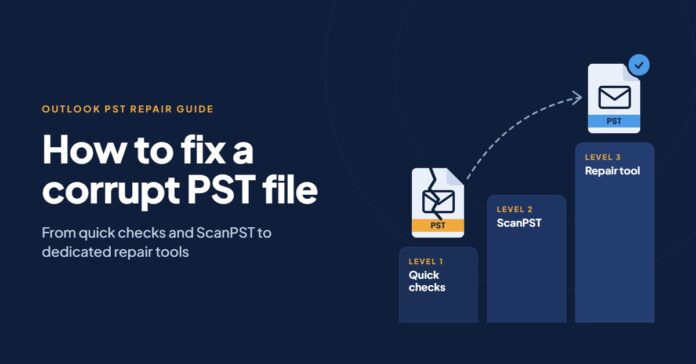
Fixing a PST file is like a game with difficulty levels. You start with the easy stuff, and only move up when the easy stuff doesn’t work. Most people never get past level two. Everything up to the last level costs nothing.
One rule before level one, though. Close Outlook and copy your PST somewhere safe, like an external drive. Every fix below writes to the file, and a clean copy means a failed attempt is never the end of the road.
Start by Reading the Error Message
It sounds obvious, but most people click the error away without reading it. The wording often tells you where to begin, and it can save you running a repair you don’t need.
| What Outlook says | What’s usually going on | Where to start |
| “Cannot start Microsoft Outlook. Cannot open the set of folders.” | Could be the PST, could be a broken profile or add-in | Level 1 |
| “The file xxxx.pst cannot be accessed” or “is in use” | Outlook is still running, or something else has the file locked | Level 1 |
| “xxxx.pst is not a personal folders file” | Damage to the file’s internal structure | Level 2 |
| “Errors have been detected in the file” | Corruption Outlook has spotted itself | Level 2 |
| “The file has reached its maximum size” | An old ANSI PST that hit its 2 GB limit | Level 3 |
No message at all, just missing folders or constant freezing? Start at level 1 anyway. It only takes a few minutes.
Level 1: Rule out the Things That Aren’t Corruption
A surprising number of “corrupt” PST files are perfectly healthy. Something is just stopping Outlook from getting at them. First, make sure Outlook has actually closed. Open Task Manager and end any OUTLOOK.EXE still hanging about. Phone sync tools and some add-ins are known for keeping it alive in the background.
Next, find the PST (usually under Documents\Outlook Files), right-click it and choose Properties. If Read-only is ticked, untick it.

While you’re looking at the path, check where the file lives. If it’s on a network drive or inside a OneDrive, Google Drive or Dropbox folder, move it to a normal local folder. Microsoft doesn’t support PST files on network shares, and sync apps fiddling with the file while Outlook writes to it is a classic cause of damage.
Then try Outlook in safe mode. Press Windows + R, type outlook.exe /safe and hit Enter. Safe mode loads Outlook without add-ins. If it opens fine this way, a dodgy add-in is your problem, not the PST, and you can switch add-ins off one by one under File > Options > Add-ins.
Level 2: Run ScanPST
If level 1 didn’t sort it, the file itself is probably damaged. Time to use Microsoft’s free Inbox Repair Tool, better known as ScanPST.
You won’t find it in the Start menu. On Outlook 2016, 2019, 2021 and Microsoft 365, it normally sits in C:\Program Files\Microsoft Office\root\Office16. On Outlook 2013 it’s in the Office15 folder instead, and on 32-bit Office you’ll be looking under Program Files (x86). If none of those ring a bell, search File Explorer for scanpst.exe.
With Outlook shutdown, open the tool, browse to the PST and click Start. It works through eight phases, which can be slow on a big mailbox. When it lists errors, keep the backup option ticked and press Repair.
Now for the bit that trips people up. A single pass often isn’t enough. ScanPST tends to fix one layer of problems and expose another, so run it again, and again if needed, until it comes back clean. Only then open Outlook. If Outlook loads and your mail is all there, you’re done. Back it up and get on with your day. If folders are still empty, or ScanPST won’t even open the file, carry on.
Level 3: Download & Run PST Repair Tool
Some PST files are simply too far gone for the free tools. ScanPST crashes, or quits with “An unexpected error has prevented access to this file.” An old ANSI PST has blown past 2 GB and won’t open at all. Or every step above has run, and the folders you care about are still blank. This is where dedicated PST repair service earns its place.
Stellar Online PST Repair is the one I’d try first. It’s built for badly damaged and oversized PST files, including ones ScanPST refuses to touch. After the scan you get a three-pane preview, much like Outlook itself, so you can click through recovered emails, attachments, contacts and calendar items and confirm the important ones are there. It can also find items that were deleted from the PST, and saves to a new PST or to formats such as MSG, EML and PDF.