

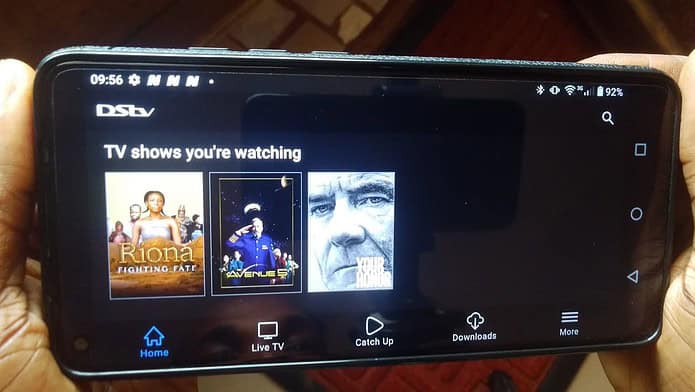
DStv Stream (formerly DStv Now, and often just called the DStv app) is MultiChoice’s internet streaming service that lets you watch live TV, movies, series, and sport on your phone, tablet, laptop, or smart TV anywhere you have a decent internet connection. It’s the successor to DStv Mobile, the old DVB-H service that only worked on a handful of compatible phones. DStv Stream drops that hardware limitation entirely: any device with a browser or the DStv Stream app and a solid 3G, 4G, 5G, or Wi-Fi connection can tune in.
You no longer need a satellite dish or decoder to use it. There are now two ways in. If you already have an active DStv subscription, streaming comes included at no extra cost; you simply link your account and go. And if you don’t own a decoder at all, you can now take a standalone, streaming-only DStv subscription, choose a package, and start watching in minutes. No dish, no installation, no long-term contract.
For Nigerians, that means you can catch Big Brother Naija, live football, your favorite channels, and Catch Up episodes on the move, whether you’re commuting in Lagos, traveling, or just want to keep watching after a power cut takes out the TV. In this guide, we’ll walk you through exactly how DStv Stream works in 2026: what you need, how to watch, how to save data, the devices and countries it supports, and how to keep streaming even when you’re outside Africa.
With DStv Stream, you can watch all your regular DStv programming online. So, instead of getting stuck on your sofa watching on your TV, DStv Stream lets you watch your favorite shows on the move on your phone or laptop.
What you need to access DStv Stream
- A DStv or standalone DStv Stream Subscription.
- An Internet-enabled PC, Mac, Android Phone, iPhone, iPad, or any Smartphone or Tablet. Some Smart TVs are also supported.
- A supported Browser or DStv Stream App for Android or iOS devices, as well as other smart devices. You can download DStv Stream for Android at the Google Play Store, and to download DStv Stream for iOS at the Apple App Store.
- MultiChoice ID (easy to register at the dstv.stream website, requires your name, email address, country, and phone number)
- An Internet Connection (Broadband connection like Wi-Fi, 5G, 4G LTE, 3G)
- A Data Plan (Preferably an unlimited Data plan)
You can connect up to four devices to your DStv Stream account. However, only two simultaneous streams (1 stream + 1 mobile stream) are supported for standalone DStv Stream subscriptions, and only one stream for decoder-linked DStv Stream subscriptions.
This distinction is important because most online reports suggest two simultaneous streams without noting the difference. However, our test in Nigeria, attempting to stream on two devices on a decoder-linked DStv Stream Premium subscription, failed with a notification that we have reached our streaming limit on the second device, which means that only one stream is currently supported on decoder-linked accounts in Nigeria.
Now that you know what you need to access the service, let us guide you through the process.

How to Subscribe to DStv Stream
DStv Stream used to be a complimentary offering for traditional DStv subscribers. However, while traditional DStv subscribers still get DStv Stream as a free complimentary add-on, DStv now also offers a standalone subscription for DStv Stream.
This means that you can now subscribe to DStv without a decoder and satellite dish. All you need is an internet connection and a device that supports the DStv Stream App or a compatible internet browser. This is a great option for cord-cutters.
To subscribe to DStv Stream, visit the DStv Stream website at dstv.stream, select your package (DStv Premium, Compact Plus, Compact, Confam, or Yanga), create your login details (MultiChoice ID), then set up your payment and complete payment.
Once you complete your payment successfully, you can now start streaming your favorite TV show. If you are a satellite subscriber, just link your smartcard on the DStv Stream to start streaming.

You can also catch up with live series and programmes you missed by watching them on the DStv Stream App or website.
DStv Stream Price and Packages
One of the biggest changes to DStv Stream is that you no longer need a decoder to pay for it. You can now take a streaming-only subscription on any of the main DStv packages, watch on your phone, laptop, or smart TV, and switch or cancel month to month with no long-term contract. Existing satellite subscribers, meanwhile, get DStv Stream included free; you just link your smartcard and start watching.
The streaming-only tiers mirror the regular DStv bouquets, so the pricing is essentially the same as the satellite packages. Here’s how they line up in Nigeria:
| Package | Monthly Price (₦) | Best For |
|---|---|---|
| Yanga | 6,000 | Families wanting more entertainment |
| Confam | 11,000 | Broader entertainment and some sport |
| Compact | 19,000 | Sport, strong local with international mix, Showmax Originals |
| Compact Plus | 30,000 | Serious sports fans (all football, more SuperSport), Showmax Originals |
| Premium | 44,500 | Everything DStv offers, Showmax Originals |
Prices shown are indicative — MultiChoice revises tariffs periodically, so confirm the current figures on our DStv subscription prices page or the official DStv site before subscribing. Note that the entry-level Padi package is not available on DStv Stream.
Three things worth knowing in 2026. First, Showmax now lives inside the DStv Stream app; the standalone Showmax app was discontinued, so Showmax Originals and content are accessed through DStv Stream on Compact, Compact Plus, and Premium packages. If you were a standalone Showmax subscriber, your library has moved here.
Second, standalone streaming customers now get an extra concurrent stream, so more than one screen in the household can watch at the same time. Third, decoder-linked subscriptions get DStv Stream free to access the content class available to their decoder subscription and can only stream on one device at a time.
Which package makes sense comes down to what you actually watch. If it’s mainly Big Brother Naija, local channels, and general entertainment, a mid-tier bouquet like Compact does the job. If you can’t miss a Premier League or Champions League fixture, Compact Plus or Premium is where the full football coverage sits. You can compare the complete channel line-ups on our DStv packages page.
How to Watch Live TV, Sports, and Movies on DStv Stream
- Visit dstv.stream on your browser or open the DStv Stream App. The App is available for Android or iOS devices, or other supported smart devices like compatible smart TVs. You can download the App at the Play Store or Apple Store.
- Log in with your MultiChoice ID. You will need to create a MultiChoice ID the first time you log in. Visit dstv.stream on your browser and click on the Sign up button to create your MultiChoice ID. The sign-up requires your name, email address, country, and phone number.
- Search for the TV show or channel you want to watch. Scroll through the Home section to find episodes of your favorite shows and movies that you may have missed. You can go to the Live TV section to see programmes currently airing on every channel available on your DStv package. At the top of the app or website, you will see a menu for TV Shows, Movies, Sport, and Kids. Click on any to see what to watch in that category. Use the search icon if you have a specific show, series, or movie in mind. You can also visit the TV Guide to see upcoming shows and set reminders for shows you may want to watch
- Click on the TV show, Movie, or channel you want to watch. When you see a TV show you want to watch, click or tap on it to get to the details page, where you can either stream or download the show. For live TV, you click on the channel you want to watch to begin live streaming.
Features of DStv Stream
Now, let’s look at some of the features of the service.
Watch Live TV
DStv Stream enables you to stream live TV on your mobile devices, laptops, smart TV, and some gaming consoles. In the live TV section of the app or website, you will find all the channels that are available live on your current subscription package, with the name of the current show airing. You will also see an indicator of how far the program has gone. Clicking the channel opens the screen where you can watch the live TV show.
The channels are also tagged to categories, which makes it easy to filter channels by category. Categories available include Sport, General Entertainment, News and Commerce, Music, Documentary, Children, Lifestyle and Culture, and Religion. There is also a Recently Watched Channels category for easy access to channels you watched recently.
With live TV, you no longer have to worry about programme interruptions during power failure or bad weather, as you can continue your viewing on your mobile phone or laptop.
You can now watch live TV programs including Big Brother Naija, while on the move, just like in the days of DStv Mobile. You can also watch Live football matches like the Premier League and UEFA Champions League as long as the coverage is on your current DStv package.
Watch Movies, TV Shows, Series, and Highlights of Sport Events on-Demand
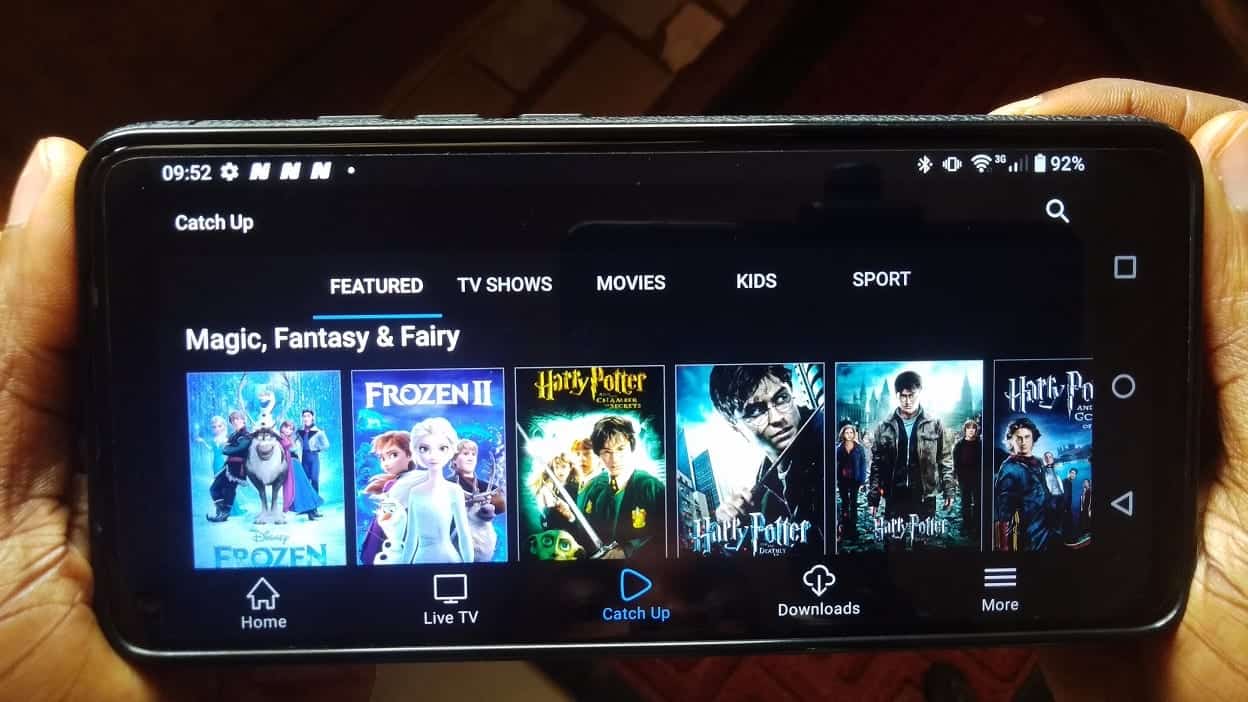
Missed any episode of your favorite show, or you just want to rewatch a recently aired TV show? The video-on-demand service is for you. DStv Stream keeps a catalog of popular TV shows, Movies, and highlights of sporting events on DStv.
The Video on Demand service enables you to watch episodes of the currently airing seasons of your favorite TV shows after they have aired on the live channel.
You can either stream the episodes or download them so that you can watch them offline later. However, downloads are only available on the Mobile App. When you are using a browser, you are restricted to streaming only. Shows are usually available on demand within 2 hours of their first broadcast on DStv.
Lots of Entertainment for Kids with Kids’ Lock
Aside from the children’s shows on Live TV and on-demand streaming, DStv Stream offers a dedicated kids section featuring a variety of shows for children.
The beauty of the kids section is that you can set up a PIN so that once you navigate to the kids section and hand over the phone to your children, they will not be able to navigate to other features of the app until they enter the same PIN you set up. With this, your kids are protected from potentially inappropriate content.
Full TV Guide
DStv Stream comes with an 8-day worth of TV programming Guide. On the TV Guide, you can watch a programme live if it is currently airing live. You can also set a reminder if the programme is upcoming. If you have an Explorer decoder, you can also instruct your Explorer decoder to record an upcoming TV show via the App.
The TV Guide also provides information about each TV show, like the season, episode, duration, rating, and a brief description. You will also see when the particular episode will air again on the channel.
Cast to TV or Big Screen
DStv Stream supports Screen mirroring technologies like Apple AirPlay, Samsung Smart View, and Google Chromecast. With screen mirroring, you can cast the current screen on your mobile App to a bigger screen like your TV, laptop, desktop, or monitor.
With AirPlay, you can mirror your iPhone or iPad screen to your Apple TV or Mac computer, while Google Chromecast is more versatile, supporting both Android and iOS devices.
DStv Stream Data Usage
Because DStv Stream delivers everything over the internet, your data plan does the work the satellite dish used to do, and video is data-hungry. How much you burn through depends almost entirely on the video quality you stream at.
At the top end, watching in Full HD can consume up to 2.3GB for a single hour of viewing. At Nigerian data prices, that adds up fast; an evening of football or a BBNaija catch-up marathon could quietly swallow a chunk of your monthly bundle.
At the other extreme, DStv’s own figures put the lowest-quality setting at roughly 100MB per hour, which is more than a 20-fold saving.
Here’s a rough guide to what each setting costs you per hour:
| Video Quality | Approx. Data Per Hour |
|---|---|
| Lowest (216p) | ~100 MB |
| Low (360p) | ~210 MB |
| Medium (576p) | ~720 MB |
| High (720p HD) | ~1.3 GB |
| Highest (1080p Full HD) | ~2.3 GB |
The practical takeaway for most viewers in Nigeria and across Africa: unless you’re on an unlimited or very high-cap plan, drop the quality a notch or two.
On a phone screen, the difference between High and Medium is barely noticeable, but the data saving is significant. We cover exactly how to change this, plus the Wi-Fi-only lock and the streaming timeout, in the How to Save Data on DStv Stream section below. If you’re shopping for a bundle to stream on, our guide to the best data plans is a good starting point.
How to Save Data on DStv Stream
Using DStv Stream involves streaming or downloading videos. This means huge amounts of data are involved. In addition, some channels on DStv come in HD quality, which means you might need to break the bank if you choose to watch in HD.
For example, watching videos in Full HD (1080p) can consume up to 2.3GB for just an hour of viewing, which might be outrageous for most budgets in Nigeria and Africa. This is why it is recommended that you use the app only when you are subscribing to an unlimited data plan or a data plan with a huge cap.
However, DStv Stream offers a switch in settings that enables you to reduce the quality or resolution of the video in order to save data consumption. In fact, you can reduce data consumption by up to 20-fold by switching to the lowest quality. According to DStv’s own data, you consume approximately 100MB per hour of viewing if you switch to the Lowest Video Quality setting (216p).
While 100MB per hour is still huge for some budgets, it is a significant savings from Full HD quality. So, to avoid spending too much on data, it is a good idea to lower the video quality in settings.
How to Save Data on DStv Stream with lower video quality
- Go to the More Menu on the App or the Dropdown Menu on the site
- Tap on Settings
- Tap on Maximum Video Quality
- Set the required video quality. Options: Highest (up to 1080p HD), High (up to 720p HD), Medium (up to 576p), Low (up to 360p), or Lowest (up to 216p)
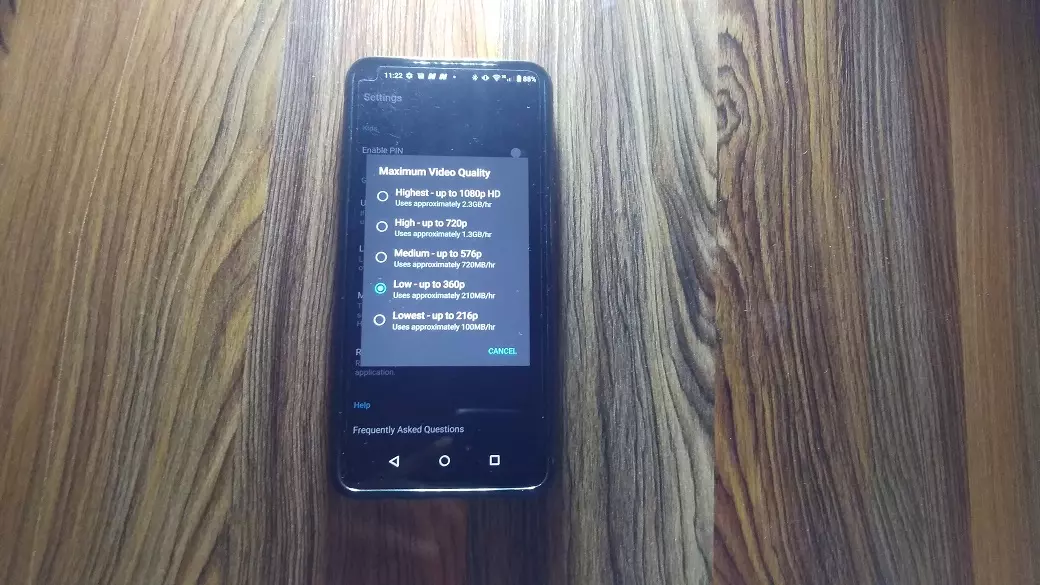
You can also adjust the video while streaming. Just tap or click on the screen to reveal the Settings icon. The Maximum Video Quality selection menu will appear once you tap or click the Settings icon. Select the video quality you prefer and the app will start streaming at that quality.
DStv Stream also has an option to restrict viewing only to Wi-Fi networks. This is on by default. A warning will be displayed each time you try to watch while on mobile data. You will have to tap Continue to watch with Mobile data. If you want to avoid this warning, you can go into the settings and toggle on the Use Mobile Data option.
Additionally, there is an option to time out live streaming after a specified period. The default is 2 hours, but you can set it for as little as 5 minutes or as long as 4 hours. This feature ensures you do not get lost in streaming. It could also be helpful if you fall asleep while streaming a TV show. If you choose, you can disable this feature entirely.
To access this option, just go to the Live Streaming Timeout setting and choose the timeout duration you prefer. All these features will help you conserve data.
Which Devices can you use to watch DStv Stream?
You can watch DStv Stream on the following devices, including Cheap Android Phones:
- Android Phones running Android 8.0 or higher
- Android Tablets running Android 8.0 or higher
- Windows PCs via a Web Browser (update to the newest version possible)
- Android TV devices running Android TV 8.0 or higher
- MacBook or Mac Computer via a Web browser
- iPads running iPadOS 15.0 or higher
- iPhones running iOS 15.0 or higher
- iPod Touch running iOS 15.0 or higher
- Apple TV running tvOS 15.0 or higher
- Apple Vision running visionOS 1.0 or higher
- LG Smart TVs (WebOS 4.0 and higher)
- Samsung Smart TVs (Tizen 4.0 and higher)
- Hisense Smart TVs (Vidaa U3 and higher)
How to Watch DStv Outside Nigeria, South Africa, Africa
As you must have noticed above, DStv content is only available in Nigeria, South Africa, and mostly sub-Saharan African countries. This means you cannot stream content on the DStv Stream app outside Africa.
So, if you are on vacation outside these African countries or a recent migrant who wants to catch up with local content, your only solution is a good VPN or a smart DNS proxy.
Your best VPN choice is one with servers in your subscription country. Make sure you select a server in your subscription country. For example, if your account is a Nigerian account and you want to watch abroad while on vacation outside Nigeria, select a Nigerian server in your VPN.
A VPN (or a Virtual Private Network) offers you anonymity online by masking your real location while allowing you to pick any location supported by the service as your location. So, essentially, the best VPN services will enable you to bypass internet restrictions.
DStv has been making it harder for VPNs to circumvent their Geo-Blocking. So, expect access to be on and off.
Best VPN for Watching / Streaming DStv Outside Nigeria, South Africa, Africa
1. Surfshark
With Surfshark, you can easily access DStv with a secure connection. It also provides a great experience while watching movies and TV shows on DStv Stream, with its fast connection speeds and unlimited bandwidth.
The service offers over 4,500 servers in more than 99 countries, making it one of the best VPNs available. Additionally, Surfshark provides access to countries such as Nigeria, South Africa, and Ghana, making it ideal for people who love to watch both local content and international content. It is also a good VPN for Nigeria.
2. ExpressVPN

ExpressVPN is another top-rated VPN service. It is good to pick Nigeria, South Africa, or Kenya as your location. You get a 30-day money-back guarantee. You get best-in-class encryption with AES 256. This service also offers you the best-in-class privacy with private DNS.
It can support up to 16 simultaneous connections and is compatible with multiple devices such as Windows, Mac, Android, iOS, Linux, and Chrome, making it one of the most versatile and reliable VPNs on the market.
3. NordVPN
NordVPN is the perfect choice for those looking to watch DStv from abroad. It is the most versatile solution with support for over 20 DStv regions, including Nigeria, Ghana, Kenya, and South Africa. You can connect up to 10 devices simultaneously.
You can also rest assured that your browsing activity is safe and secure due to its no-log policy. Furthermore, NordVPN provides best-in-class encryption with AES 256 and a 30-day money-back guarantee. With over 8400 servers in over 100 countries, you have good global coverage for unblocking content from other regions.
4. CyberGhost
CyberGhost is a versatile solution that lets you choose servers in Nigeria, South Africa, and Kenya. It supports up to 7 devices simultaneously. It supports military-grade 256-bit AES encryption, split tunneling, and data leak protection.
The servers are also pretty fast. It also works well with Netflix in premium locations like the United States. This VPN is available for Android, iOS, Windows, macOS, Linux, etc.
5. PureVPN
This is another option with good coverage in Africa, boasting 91 VPN servers in six African countries, four of which have DStv coverage, namely: South Africa, Nigeria, Kenya, and Angola.
PureVPN supports 256-bit encryption, p2p tunneling, and can be used with up to 10 login accounts.
You may also be interested in the Best VPN for DStv.
How to Watch Big Brother Naija (BBNaija) Free Online and on Mobile
- Visit dstv.stream on your browser or open the DStv Stream App on your Android or iOS devices, or other compatible devices.
- Log in with your MultiChoice ID
- Click or Tap on the Live TV Menu
- Scroll down to Big Brother Naija Channel: Live Broadcast
- Tap or click on the BBNaija item to begin streaming the show
You may also be interested in How to Watch DStv in the USA, Canada, UK, Europe, Worldwide.
DStv Stream Not Working — Fixes
Because DStv Stream depends entirely on your internet connection, most problems trace back to either the network or your account. Here are the most common issues and how to fix them.
The app won’t load or keeps buffering. This is almost always a connection issue. Run a quick speed test. DStv streaming needs a stable broadband or mobile connection, and shaky internet will either buffer endlessly or drop you to very low quality. Switch from mobile data to Wi-Fi (or vice versa) to see which is stronger, restart your router, and close other apps or downloads eating your bandwidth. If the picture keeps dropping, lower the video quality in Settings → Maximum Video Quality.
You can’t log in. Make sure you’re using your MultiChoice ID and not a different email. If you’ve forgotten the password, use the “Forgot Password” link to reset it. New users need to create a MultiChoice ID the first time, so if you’ve never set one up, that’s your first step rather than a login.
“Streaming limit reached.” DStv limits how many devices can stream on one account at the same time. If you hit this message, sign out of a device you’re no longer using, or check whether someone else on your account is streaming. You can manage your registered devices from your DStv account settings online. If you are just switching from one device to another, wait a couple of minutes, because it takes some time for the stream to refresh.
A show or channel won’t play. Confirm the channel is actually part of your package; streaming only unlocks the channels in the bouquet you’re subscribed to. Also check that your subscription is active and hasn’t lapsed; an expired subscription cuts off streaming just as it does the decoder.
Downloads aren’t available. Offline downloads only work in the mobile app, not in a browser. If you’re trying to save a show for later on your laptop, that’s why the option isn’t showing; switch to the Android or iOS app.
It won’t work when you travel abroad. DStv Stream is geo-locked to Africa, so it stops working the moment you leave a supported country. This is expected behavior, not a fault. If you’re outside Africa and want to keep watching, you’ll need a VPN; see our section on how to watch DStv outside Nigeria and Africa above, or our full guide to the best VPN for DStv.
If none of the above resolves it, a clean reinstall of the app clears most lingering glitches, and DStv’s own support channels can check for account-side issues.
Countries with DStv Stream
You can access the app in the following countries:
- Nigeria
- South Africa
- Kenya
- Ghana
- Namibia
- Angola
- Botswana
- Democratic Republic of Congo
- Ethiopia
- Malawi
- Mauritius
- Mozambique
- Swaziland
- Tanzania
- Uganda
- Zambia
- Zimbabwe
- Benin
- Burkina Faso
- Burundi
- Cameroon
- Cape Verde
- Central African Republic
- Chad
- Comoros
- Congo
- Djibouti
- Equatorial Guinea
- Eritrea
- Gabon
- Gambia
- Guinea
- Guinea Bissau
- Ivory Coast
- Liberia
- Madagascar
- Mali
- Mauritania
- Mayotte
- Niger
- Reunion
- Rwanda
- Sao Tome and Principe
- Senegal
- Seychelles
- Sierra Leone
- Somalia
- St Helena Island
- Sudan
- Togo
- Tunisia
- Zanzibar
Note that these are the same countries where DStv Pay TV satellite services are available. You will not be able to watch DStv Stream if you travel outside any of these countries except with a VPN.
Frequently Asked Questions (FAQ) about DStv Stream
Is DStv Stream free?
If you already have an active DStv subscription, yes, streaming is included at no extra cost. You link your account and watch. If you don’t have a subscription, you’ll need one, either a satellite package or a standalone streaming-only plan.
Can I watch DStv Stream without a decoder?
Yes. You can take a standalone, streaming-only DStv subscription with no dish and no decoder, just an internet connection and the DStv Stream app or the dstv.stream website. This is a change from the early days, when streaming was only a free add-on for satellite subscribers.
How much does DStv Stream cost?
Streaming-only plans mirror the regular DStv bouquets, running from the Yanga package (₦6,000) up to Premium (₦44,500). DStv Stream does not currently support the entry-level Padi package. Because MultiChoice revises tariffs periodically, check the current figures on our DStv subscription prices page before subscribing.
Does it cost anything to create a MultiChoice ID or sign up?
No. Creating a MultiChoice ID at dstv.stream is free and only requires your name, email, country, and phone number. You only pay when you choose a package to subscribe to.
If I already have a DStv decoder, do I need a separate subscription to stream?
No. Your existing subscription covers streaming. Just download the DStv Stream app or visit dstv.stream, log in with your MultiChoice ID, and the same channels in your package are available to stream.
How many devices can watch DStv Stream at the same time?
You can register up to four devices on one account, but simultaneous streaming is limited. Standalone streaming subscriptions allow two streams at once (one standard stream and one mobile stream), while decoder-linked accounts in Nigeria are currently limited to a single stream at a time.
Can I share my DStv Stream account with family or friends?
You can register the account on multiple devices and household members can use it, but the simultaneous-stream limit still applies, so on a decoder-linked account, only one person can actually watch at a time. Sharing beyond your household also goes against DStv’s terms of use.
Can I download shows to watch offline?
Yes, but only in the mobile app on Android and iOS. If you’re streaming in a web browser on a laptop, you’re limited to streaming and won’t see the download option. You can make up to 25 downloads to watch later on DStv Stream.
How much data does DStv Stream use?
It depends entirely on your video quality setting. Full HD (1080p) can use up to 2.3GB per hour, while the Lowest setting (216p) drops that to roughly 100MB per hour, a saving of more than 20 times. On a phone screen, lowering the quality a notch is barely noticeable but saves a lot of data.
Does DStv Stream work outside Nigeria or abroad?
No. DStv Stream is geo-locked to the African countries where DStv operates, so it stops working the moment you leave. To watch from outside Africa, you’ll need a VPN with a server in your subscription country; see our guide to the best VPN for DStv.
Which VPN server should I choose to watch abroad?
Pick a server in the country your DStv account is registered to. If you have a Nigerian account, connect to a Nigerian server; using a South African server on a Nigerian account can cause playback to fail.
Is Showmax now part of DStv Stream?
Yes. The standalone Showmax app was discontinued, and Showmax content now lives inside the DStv Stream app for subscribers on Compact, Compact Plus, and Premium packages. If you were a standalone Showmax user, your library has moved here.
What’s the difference between DStv Stream, DStv Now, and the DStv app?
They’re the same service. It launched as DStv Now, was later rebranded DStv Stream, and is often just called “the DStv app.” Older guides and even some app-store listings still use the DStv Now name.
Can I watch DStv Stream on my smart TV?
Yes. Beyond phones, tablets, and laptops, DStv Stream supports LG (WebOS 4.0+), Samsung (Tizen 4.0+), and Hisense (Vidaa U3+) smart TVs, plus Android TV and Apple TV. You can also cast from your phone using AirPlay, Chromecast, or Samsung Smart View.
Can I watch live football like the Premier League and Champions League?
Yes, as long as the coverage is included in your subscribed package. Live sport, including the Premier League and UEFA Champions League, streams on DStv Stream when your bouquet (typically Compact Plus or Premium) carries the relevant SuperSport channels.
Can I record shows on DStv Stream?
Not directly within the app the way a PVR decoder records. However, the on-demand library lets you watch recently aired episodes, and if you own an Explorer decoder you can schedule recordings on it through the app’s TV Guide. However, you can download up to 25 movies or shows from the on-demand library to watch later offline.
Why does DStv Stream keep logging me out or say “streaming limit reached”?
This usually means the account is signed in or streaming on another device. Sign out of devices you no longer use, and if you’ve just switched devices, wait a couple of minutes for the previous stream to release before starting a new one.
Why does DStv Stream keep buffering or stop working?
Most problems trace back to your internet connection or your account. Check your connection speed, switch between Wi-Fi and mobile data, lower the video quality, and confirm your subscription is active. See our DStv Stream Not Working — Fixes section above for the full checklist.
How soon can I watch a show on-demand after it airs?
Recently aired episodes usually appear in the on-demand section within about two hours of their first broadcast on DStv.
Conclusion
DStv Stream has come a long way from the app that simply mirrored your decoder. In 2026, it’s a full streaming service in its own right you can watch with an existing DStv subscription for free, or skip the dish and decoder entirely with a standalone streaming-only plan and start watching in minutes.
Between live TV, Catch Up, an 8-day guide, a kids’ section, offline downloads, and Showmax Originals, it covers most of what a Nigerian household actually watches, on whatever screen is closest.
The two things worth keeping in mind are data and location. Streaming is data-hungry, so match your plan to your viewing and lower the video quality when you’re on a metered bundle. And because the service is locked to Africa, you’ll need a good VPN to keep watching when you travel outside the continent.
If you’re deciding how to watch, start by choosing your route: free with your current subscription, or a fresh streaming-only plan, then pick the package that fits what you watch most. Have a question we didn’t cover, or a tip from your own experience with the app? Share it with us on social; we read and reply to every one.




